Why MagicDash 4
\nRace data. Right in front of you.
\n\n4″ 800×480 Touchscreen
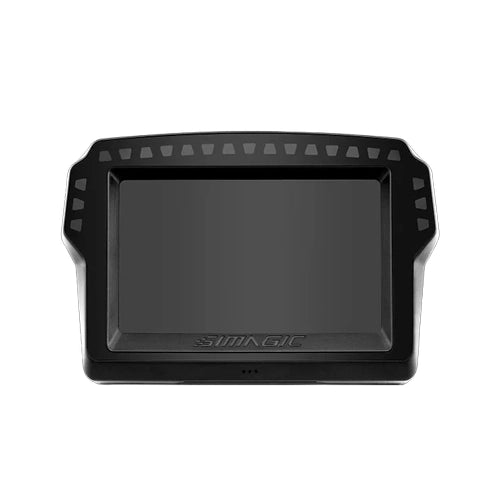
\nVivid 4-inch display with crisp 800×480 resolution. High-visibility dashboard layouts readable at a glance, RPM, gear, lap delta, tyre temps, fuel, sector times, and more, right in your line of sight.
\n15 RGB Shift Lights + 6 Side LEDs
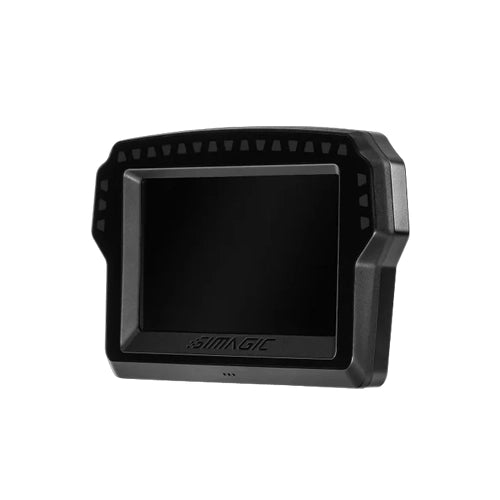
\n15 top-mounted RGB shift indicator LEDs and 6 side-mounted function LEDs, all configurable via SimPro Manager V3 or SimHub. Instant visual cues for gear shifts, flags, ABS, DRS, tyre condition, and more.
\nMagnetic Snap-On Mounting
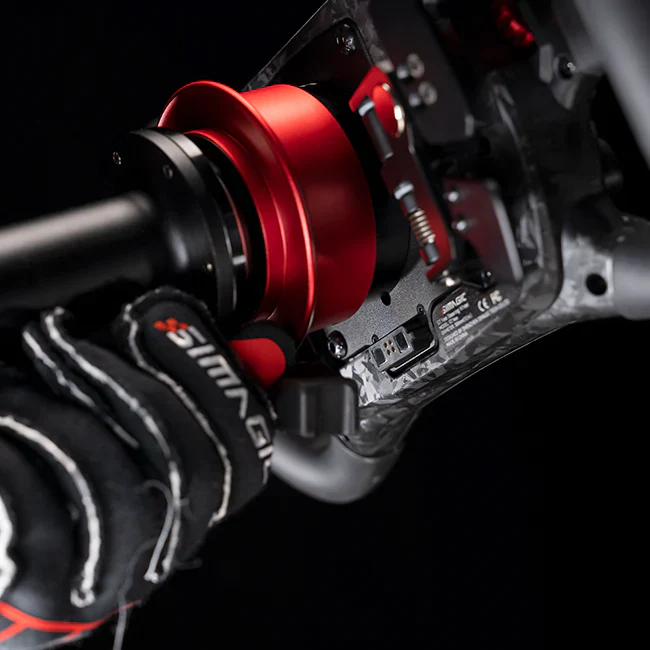
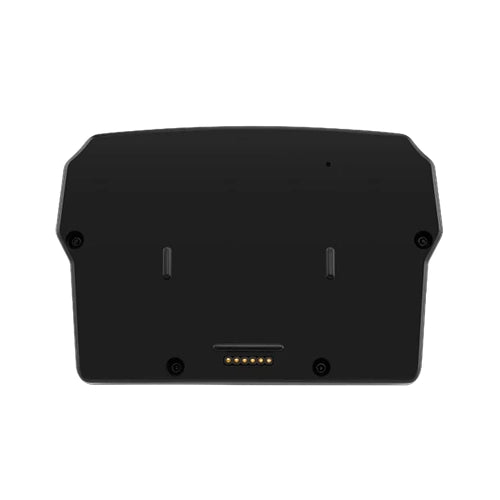
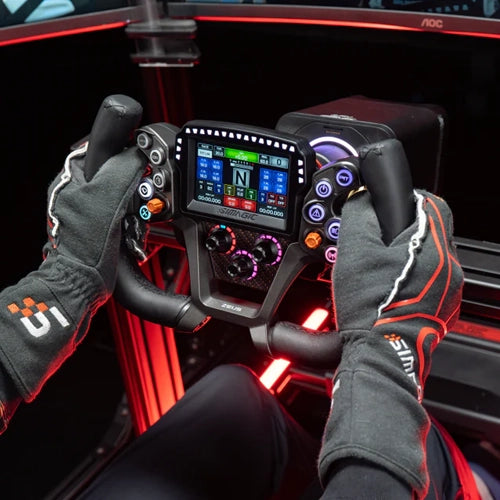
\nSnaps magnetically onto any Zeus Series steering wheel via MagDock in one motion, attaches and detaches without tools. One MagicDash 4 moves freely between Zeus Formula, GT, and Sport. Also mounts on Alpha EVO wheelbases directly, or any other base via MagDock.
\nBuilt-in Touchpad, No Mouse Required
\nSimagic's patented touch interaction technology lets you control your PC desktop directly from the MagicDash 4 touchscreen. Switch dashboards, adjust settings, navigate SimPro Manager, all without reaching for a mouse.
\nFull SimHub Compatibility
\nSimHub dashboard profiles display directly on the MagicDash 4 touchscreen. Access the full SimHub community library of layouts, or build your own. Supports iRacing, ACC, Assetto Corsa, rFactor 2, LMU, F1 series, GT7, WRC, and all major PC racing sims.
\nOfficial Dashboard Presets
\nInstall SimPro Manager V3 and switch instantly between official Simagic presets optimised for F1, GT, prototype, rally, and more. Simagic Dashboard Editor (coming soon) will allow on-the-fly layout editing without a PC.
\nProduct Detail
\nEverything the MagicDash 4 does
\n\n \n \n
\n Mount It Your Way
\nOn the Wheel. On the Base. On Any Rig.
\nZeus Series · Alpha EVO · Alpha Series · Third-Party Bases
\nMagicDash 4 mounts wherever makes sense for your rig. On Zeus wheels it snaps magnetically into the centre of the wheel, always in your line of sight, no cables. On Alpha EVO wheelbases it mounts directly via built-in front mounting points. On Alpha Series and third-party bases, MagDock (sold separately) provides the mount and PC connection. One MagicDash 4 serves multiple wheels and rigs.
\n- \n
- Zeus Formula / GT / Sport, magnetic snap-on via MagDock connector, no tools, no cables. \n
- Alpha EVO Series, direct front-mount via built-in base mounting holes. \n
- Alpha Series / M10 / Third-party, via MagDock accessory (sold separately). \n
- Run multiple displays, each MagicDash 4 operates independently with unique data. \n
Personalised Lights. Instant Insight.
\n21 Configurable LEDs. Real-Time Feedback.
\n15 Shift Lights · 6 Side LEDs · SimHub + SimPro V3
\n15 top-mounted RGB shift indicator LEDs and 6 side-mounted function LEDs react to live telemetry in real time. Configure shift points, flag colours, tyre condition cues, ABS activation, and more, all via SimPro Manager V3 or SimHub. Never miss a gear change or track condition update.
\n- \n
- 15 top-mounted shift LEDs, RPM-reactive, fully configurable colour zones and shift points. \n
- 6 side function LEDs, map to flags, ABS, TC, tyre wear, DRS, ERS, or any telemetry channel. \n
- SimPro Manager V3, native Simagic configuration with official dashboard presets (F1, GT, prototype). \n
- SimHub, full community library access and custom layout builder. Free to download. \n
 \n
\n  \n
\n Navigate with a Touch
\nBuilt-in Touchpad · SimHub · SimPro Manager V3
\nPC Control From the Screen · No Mouse Required
\nSimagic's patented touch interaction technology transforms the MagicDash 4 touchscreen into a full PC trackpad. Control your PC desktop, switch between dashboard pages, adjust SimPro settings, and navigate SimHub, all from the wheel without leaving your seat. Connect wirelessly to your PC via the included AirLink hotspot.
\n- \n
- Built-in touchpad, full cursor control from the MagicDash 4 touchscreen. \n
- Switch dashboard pages, cycle between multiple screen layouts mid-session. \n
- AirLink included, wireless connection to PC ships in every MagicDash 4 box. \n
- PC only, compatible with all major PC racing simulators via SimHub or SimPro V3. \n
Standalone Dashboard (DDU)
\nNo Zeus Wheel Required.
\nAny Cockpit · Any Wheelbase · Any Sim
\nMagicDash 4 works as a fully standalone cockpit-mounted DDU, no Zeus wheel required. Mount it on your Alpha EVO base directly, on an Alpha Series or third-party base via MagDock, or anywhere on your cockpit frame. The same full telemetry experience, independent of your steering wheel choice.
\n- \n
- Alpha EVO, mount directly via front base mounting holes, no adapter. \n
- Alpha Series / Third-party, MagLink Pro Xtend + MagDock required (sold separately). \n
- Independent operation, runs SimHub or SimPro layouts without a Zeus wheel present. \n
- Multiple displays, run two or more MagicDash 4 units independently for expanded telemetry. \n
 \n
\n The Full Range
\nFour Accessories. Every Setup Covered.
\nWhether you're connecting a Zeus wheel to a third-party base, mounting MagicDash 4 standalone, or going fully wireless, there's a dedicated accessory for every scenario.
\n\n \n
\n Dashboard Mount
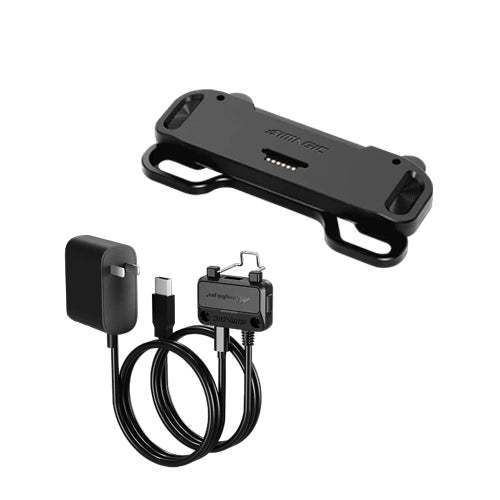
\nMagDock
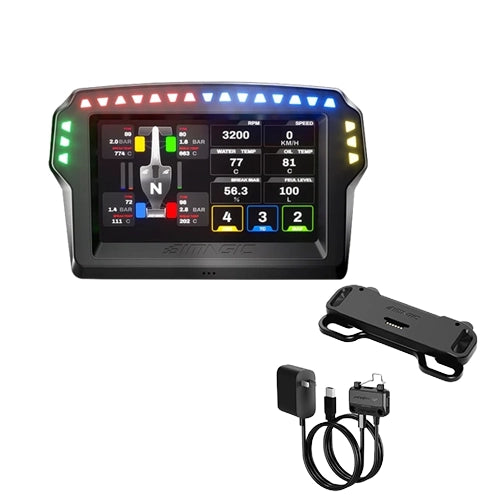
\nMounts the MagicDash 4 as a standalone display on Alpha Series and third-party wheelbases. CNC aluminium, built-in MagLink Pro Hub, height-adjustable stand, anti-detachment locking plug.
\n \n
\n Wheelbase Adapter
\nMagLink Pro
\nConnects Zeus Series wheels to Alpha Series / M10 and all third-party direct drive bases. Full USB wired connectivity, all inputs, RGB shift lights, and SimHub retained.
\n \n
\n Wireless Adapter
\nMagLink Pro Xtend
\nWireless Zeus / Neo X connection for Alpha Series bases, with extended reach. Required for standalone MagicDash 4 on any non-EVO rig. Also unlocks SimHub for Neo X and GT Neo.
\n \n
\n Wireless Hotspot
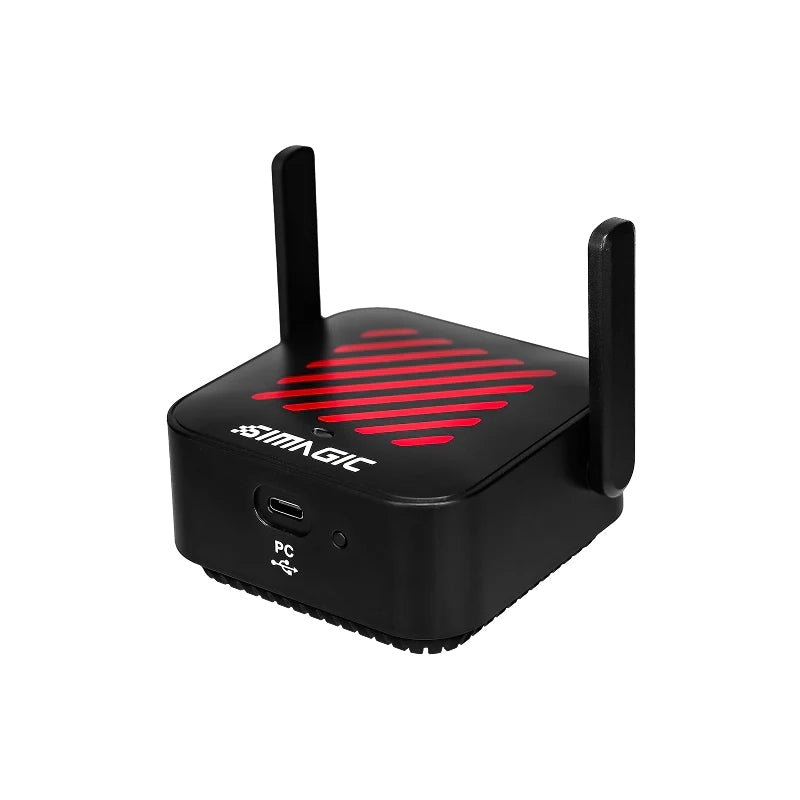
\nAirLink
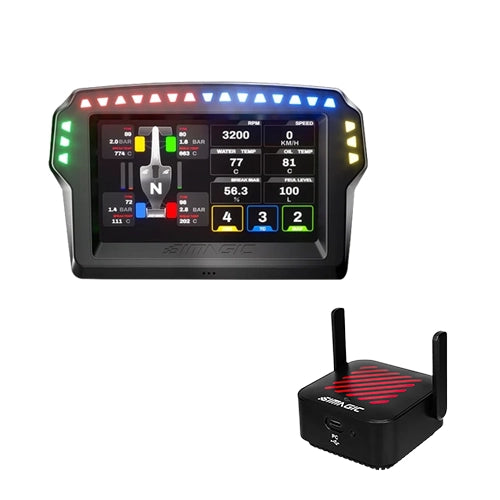
\nWireless hotspot connecting MagicDash 4 to your PC for live telemetry. Simagic's proprietary anti-interference protocol. Already included with every MagicDash 4 purchase, only needed as a standalone replacement.
\nTechnical Specifications
\nMagicDash 4, Full Specifications
\n\nSimagic UP+ Ecosystem
\nMagicDash 4 Telemetry Dashboard
\nCommon questions
\nMagicDash 4 FAQ
\nGetting Started
\n\nWhat is the MagicDash 4 and what does it do?
\nThe MagicDash 4 is Simagic's modular telemetry dashboard, a 4-inch 800×480 touchscreen display with 15 RGB shift indicator LEDs, 6 side function LEDs, and a built-in touchpad. It shows live race telemetry (RPM, gear, lap delta, tyre temperatures, fuel load, sector times and more), lets you control your PC desktop from the display, and runs official Simagic dashboard presets plus full SimHub community layouts. It's compatible with Zeus Series steering wheels, Alpha EVO wheelbases, and any other rig via MagDock.
\nDoes the MagicDash 4 work without a Zeus wheel?
\nYes. MagicDash 4 operates as a fully standalone cockpit-mounted DDU independent of any steering wheel. On Alpha EVO bases it mounts directly to the front of the base. On Alpha Series, M10, and third-party bases it uses MagLink Pro Xtend and MagDock (both sold separately). The same full telemetry experience is available in both modes, wheel-mounted or standalone.
\nWhat comes in the box with MagicDash 4?
\nEvery MagicDash 4 includes: the MagicDash 4 display unit, the AirLink Wireless Hotspot (for wireless PC connection, no separate purchase needed), a USB-C data cable, and user documentation. MagDock, MagLink Pro, and MagLink Pro Xtend are sold separately depending on your setup.
\nMounting & Compatibility
\n\nWhat wheelbases is the MagicDash 4 compatible with?
\nNative (no adapter): All Simagic Alpha EVO Series bases (Alpha EVO 9Nm, Alpha EVO Pro 18Nm, Alpha EVO Ultra, Alpha EVO Sport), mounts directly to the front panel, and Zeus wheels snap it on magnetically.
Via MagDock: Simagic Alpha Series and M10 (Alpha Mini, Alpha, Alpha Ultimate, M10) and all third-party direct drive bases with standard front mounting holes, including Simucube, MOZA, Fanatec, VRS, Asetek, and others.
Does MagicDash 4 work on my Zeus wheel?
\nYes, MagicDash 4 magnetically snaps into the centre of all three Zeus Series wheels (Formula, GT, Sport) via the built-in MagDock connector. It attaches and detaches in one motion, no cables required at the wheel. One MagicDash 4 can be moved between Zeus Formula, GT, and Sport freely.
\nDo I need MagDock to use MagicDash 4 on a Zeus wheel?
\nNo, MagDock is not required when mounting MagicDash 4 on a Zeus Series wheel or on an Alpha EVO wheelbase. The MagDock connector is built into the Zeus wheel body and the Alpha EVO base. MagDock is only required when mounting MagicDash 4 as a standalone display on an Alpha Series, M10, or third-party base that lacks built-in mounting points.
\nWhat is the difference between using AirLink and MagLink Pro for the MagicDash 4?
\nAirLink is the wireless hotspot included with every MagicDash 4, it's the USB-C dongle you plug into your PC to create the wireless link between the PC and the display. It handles telemetry data transmission from SimHub or SimPro Manager V3 to the MagicDash 4. MagLink Pro is the adapter for your Zeus steering wheel on non-EVO bases, it's unrelated to how MagicDash 4 connects to the PC. Both may be needed together depending on your setup.
\nSoftware & Dashboard Presets
\n\nWhat software does the MagicDash 4 use?
\nMagicDash 4 is supported by two free software platforms: Simagic SimPro Manager V3, the native Simagic tool with official dashboard presets (F1, GT, Prototype and more), LED configuration, and firmware management; and SimHub, the universal telemetry platform with thousands of community-created layouts and a full custom dashboard editor. Both are free to download. SimHub has an optional donation to unlock advanced features but is fully functional without payment.
\nWhat racing simulators work with MagicDash 4?
\nVia SimHub, MagicDash 4 is compatible with virtually every major PC racing simulator: iRacing, Assetto Corsa, Assetto Corsa Competizione (ACC), Assetto Corsa Evo, rFactor 2, Le Mans Ultimate, Automobilista 2, F1 24, F1 25, Gran Turismo 7 (via PC bridge), Dirt Rally 2.0, WRC, BeamNG.drive, RaceRoom, and more. PC only, no console support.
\nCan I create my own dashboard layouts?
\nYes, via SimHub you can build fully custom dashboard layouts from scratch, or modify existing community-created layouts to your preference. Simagic is also developing a dedicated Dashboard Editor (announced alongside the Zeus Series launch) that will allow even easier on-the-fly layout editing without needing SimHub's full interface. This is available as a future software update.
\nThe Touchpad & Touch Controls
\n\nHow does the built-in touchpad work?
\nThe MagicDash 4's touchscreen doubles as a full PC trackpad via Simagic's patented touch interaction technology. Once connected via AirLink, you can move your cursor, click, and scroll on your PC desktop directly from the display face. This lets you switch between dashboard pages, adjust SimPro Manager settings, and navigate your PC without taking your hands off the cockpit to reach for a mouse.
\nPurchasing at Player1 Sim Gear
\n\nCan I buy MagicDash 4 bundled with a Zeus wheel?
\nYes. MagicDash 4 is available standalone (USD $199) or bundled with any Zeus wheel: Zeus Formula + MagicDash 4 (USD $669), Zeus GT + MagicDash 4 (USD $509), Zeus Sport + MagicDash 4 (USD $469). All bundles include AirLink. Contact us for current AUD pricing and availability.
\nIs MagicDash 4 in stock in Australia?
\nWe stock MagicDash 4 in our Queensland warehouse as an authorised Simagic dealer. Call 0488 385 870 to confirm current availability before ordering. MagLink Pro, MagLink Pro Xtend, and MagDock are also stocked for complete bundle orders.
\nWhat warranty does the MagicDash 4 come with?
\nMagicDash 4 purchased from Player1 Sim Gear carries Simagic's 2-year manufacturer warranty and is covered by Australian Consumer Law. All warranty claims are handled locally, no international shipping. Contact us at player1simgear.freshdesk.com or on 0488 385 870.
\nNot sure if MagicDash 4 will work with your specific setup?
\nThe compatibility question is a common one, it depends on your wheelbase, whether you have a Zeus wheel, and how you want to mount the display. Call us on 0488 385 870 with your wheelbase model and we'll confirm exactly what you need, including whether you need MagDock, MagLink Pro, or MagLink Pro Xtend alongside your MagicDash 4 purchase.
\nAfter-Sales
\nWarranty & Support
\nSimagic 2-Year Warranty
\nAll Simagic products from Player1 Sim Gear carry Simagic's manufacturer warranty. Authorised dealer, claims handled locally in Australia.
\nAustralian Consumer Law
\nAll purchases covered by ACL, acceptable quality, fitness for purpose, and statutory repair/replace/refund rights.
\nLocal Support, 0488 385 870
\nQueensland-based team. Pre-sale compatibility advice, software setup help, and warranty claims, all handled in Australia.
\nHelp Desk
\nOpen a ticket at player1simgear.freshdesk.com for technical queries, warranty claims, or SimHub setup help.
\nBuild the full experience
\nComplete your sim cockpit
\nPair the MagicDash 4 with a Zeus Series steering wheel, Simagic Alpha EVO wheelbase, and the rest of the UP+ ecosystem for the complete Simagic experience.
\n \n
\n Simagic Full Range
\nWheelbases, wheels, pedals & more
\nShop Simagic →
\n \n
\n Zeus Rims & Accessories
\nReplacement rims, MagLink Pro & more
\nShop Zeus Accessories →
\n \n
\n Sim Cockpits
\nRacing cockpit frames & rigs
\nShop Cockpits →
\n \n
\n VR Headsets
\nPimax Crystal Super, Crystal Light & more
\nShop VR →
\nNot sure if MagicDash 4 suits your setup?
\nThe compatibility question depends on your wheelbase, whether you have a Zeus wheel, and how you want to mount it. Give us your wheelbase model and we'll confirm exactly what you need before you order.
\n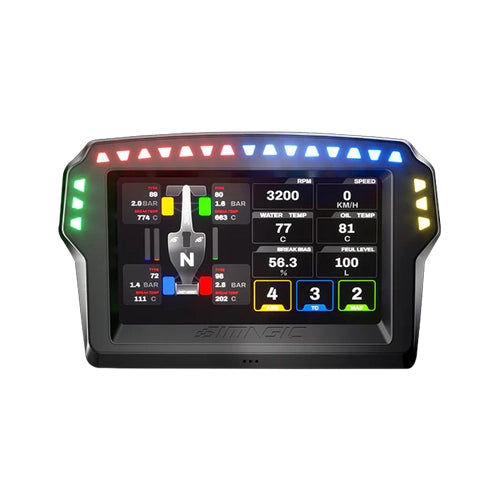
Original: $349.00
-65%$349.00
$122.15The Story


Why MagicDash 4
Race data. Right in front of you.
4″ 800×480 Touchscreen
Vivid 4-inch display with crisp 800×480 resolution. High-visibility dashboard layouts readable at a glance, RPM, gear, lap delta, tyre temps, fuel, sector times, and more, right in your line of sight.
15 RGB Shift Lights + 6 Side LEDs
15 top-mounted RGB shift indicator LEDs and 6 side-mounted function LEDs, all configurable via SimPro Manager V3 or SimHub. Instant visual cues for gear shifts, flags, ABS, DRS, tyre condition, and more.
Magnetic Snap-On Mounting
Snaps magnetically onto any Zeus Series steering wheel via MagDock in one motion, attaches and detaches without tools. One MagicDash 4 moves freely between Zeus Formula, GT, and Sport. Also mounts on Alpha EVO wheelbases directly, or any other base via MagDock.
Built-in Touchpad, No Mouse Required
Simagic's patented touch interaction technology lets you control your PC desktop directly from the MagicDash 4 touchscreen. Switch dashboards, adjust settings, navigate SimPro Manager, all without reaching for a mouse.
Full SimHub Compatibility
SimHub dashboard profiles display directly on the MagicDash 4 touchscreen. Access the full SimHub community library of layouts, or build your own. Supports iRacing, ACC, Assetto Corsa, rFactor 2, LMU, F1 series, GT7, WRC, and all major PC racing sims.
Official Dashboard Presets
Install SimPro Manager V3 and switch instantly between official Simagic presets optimised for F1, GT, prototype, rally, and more. Simagic Dashboard Editor (coming soon) will allow on-the-fly layout editing without a PC.
Product Detail
Everything the MagicDash 4 does

Mount It Your Way
On the Wheel. On the Base. On Any Rig.
Zeus Series · Alpha EVO · Alpha Series · Third-Party Bases
MagicDash 4 mounts wherever makes sense for your rig. On Zeus wheels it snaps magnetically into the centre of the wheel, always in your line of sight, no cables. On Alpha EVO wheelbases it mounts directly via built-in front mounting points. On Alpha Series and third-party bases, MagDock (sold separately) provides the mount and PC connection. One MagicDash 4 serves multiple wheels and rigs.
- Zeus Formula / GT / Sport, magnetic snap-on via MagDock connector, no tools, no cables.
- Alpha EVO Series, direct front-mount via built-in base mounting holes.
- Alpha Series / M10 / Third-party, via MagDock accessory (sold separately).
- Run multiple displays, each MagicDash 4 operates independently with unique data.
Personalised Lights. Instant Insight.
21 Configurable LEDs. Real-Time Feedback.
15 Shift Lights · 6 Side LEDs · SimHub + SimPro V3
15 top-mounted RGB shift indicator LEDs and 6 side-mounted function LEDs react to live telemetry in real time. Configure shift points, flag colours, tyre condition cues, ABS activation, and more, all via SimPro Manager V3 or SimHub. Never miss a gear change or track condition update.
- 15 top-mounted shift LEDs, RPM-reactive, fully configurable colour zones and shift points.
- 6 side function LEDs, map to flags, ABS, TC, tyre wear, DRS, ERS, or any telemetry channel.
- SimPro Manager V3, native Simagic configuration with official dashboard presets (F1, GT, prototype).
- SimHub, full community library access and custom layout builder. Free to download.


Navigate with a Touch
Built-in Touchpad · SimHub · SimPro Manager V3
PC Control From the Screen · No Mouse Required
Simagic's patented touch interaction technology transforms the MagicDash 4 touchscreen into a full PC trackpad. Control your PC desktop, switch between dashboard pages, adjust SimPro settings, and navigate SimHub, all from the wheel without leaving your seat. Connect wirelessly to your PC via the included AirLink hotspot.
- Built-in touchpad, full cursor control from the MagicDash 4 touchscreen.
- Switch dashboard pages, cycle between multiple screen layouts mid-session.
- AirLink included, wireless connection to PC ships in every MagicDash 4 box.
- PC only, compatible with all major PC racing simulators via SimHub or SimPro V3.
Standalone Dashboard (DDU)
No Zeus Wheel Required.
Any Cockpit · Any Wheelbase · Any Sim
MagicDash 4 works as a fully standalone cockpit-mounted DDU, no Zeus wheel required. Mount it on your Alpha EVO base directly, on an Alpha Series or third-party base via MagDock, or anywhere on your cockpit frame. The same full telemetry experience, independent of your steering wheel choice.
- Alpha EVO, mount directly via front base mounting holes, no adapter.
- Alpha Series / Third-party, MagLink Pro Xtend + MagDock required (sold separately).
- Independent operation, runs SimHub or SimPro layouts without a Zeus wheel present.
- Multiple displays, run two or more MagicDash 4 units independently for expanded telemetry.

The Full Range
Four Accessories. Every Setup Covered.
Whether you're connecting a Zeus wheel to a third-party base, mounting MagicDash 4 standalone, or going fully wireless, there's a dedicated accessory for every scenario.


Technical Specifications
MagicDash 4, Full Specifications
Simagic UP+ Ecosystem
MagicDash 4 Telemetry Dashboard
Common questions
MagicDash 4 FAQ
Getting Started
What is the MagicDash 4 and what does it do?
The MagicDash 4 is Simagic's modular telemetry dashboard, a 4-inch 800×480 touchscreen display with 15 RGB shift indicator LEDs, 6 side function LEDs, and a built-in touchpad. It shows live race telemetry (RPM, gear, lap delta, tyre temperatures, fuel load, sector times and more), lets you control your PC desktop from the display, and runs official Simagic dashboard presets plus full SimHub community layouts. It's compatible with Zeus Series steering wheels, Alpha EVO wheelbases, and any other rig via MagDock.
Does the MagicDash 4 work without a Zeus wheel?
Yes. MagicDash 4 operates as a fully standalone cockpit-mounted DDU independent of any steering wheel. On Alpha EVO bases it mounts directly to the front of the base. On Alpha Series, M10, and third-party bases it uses MagLink Pro Xtend and MagDock (both sold separately). The same full telemetry experience is available in both modes, wheel-mounted or standalone.
What comes in the box with MagicDash 4?
Every MagicDash 4 includes: the MagicDash 4 display unit, the AirLink Wireless Hotspot (for wireless PC connection, no separate purchase needed), a USB-C data cable, and user documentation. MagDock, MagLink Pro, and MagLink Pro Xtend are sold separately depending on your setup.
Mounting & Compatibility
What wheelbases is the MagicDash 4 compatible with?
Native (no adapter): All Simagic Alpha EVO Series bases (Alpha EVO 9Nm, Alpha EVO Pro 18Nm, Alpha EVO Ultra, Alpha EVO Sport), mounts directly to the front panel, and Zeus wheels snap it on magnetically.
Via MagDock: Simagic Alpha Series and M10 (Alpha Mini, Alpha, Alpha Ultimate, M10) and all third-party direct drive bases with standard front mounting holes, including Simucube, MOZA, Fanatec, VRS, Asetek, and others.
Does MagicDash 4 work on my Zeus wheel?
Yes, MagicDash 4 magnetically snaps into the centre of all three Zeus Series wheels (Formula, GT, Sport) via the built-in MagDock connector. It attaches and detaches in one motion, no cables required at the wheel. One MagicDash 4 can be moved between Zeus Formula, GT, and Sport freely.
Do I need MagDock to use MagicDash 4 on a Zeus wheel?
No, MagDock is not required when mounting MagicDash 4 on a Zeus Series wheel or on an Alpha EVO wheelbase. The MagDock connector is built into the Zeus wheel body and the Alpha EVO base. MagDock is only required when mounting MagicDash 4 as a standalone display on an Alpha Series, M10, or third-party base that lacks built-in mounting points.
What is the difference between using AirLink and MagLink Pro for the MagicDash 4?
AirLink is the wireless hotspot included with every MagicDash 4, it's the USB-C dongle you plug into your PC to create the wireless link between the PC and the display. It handles telemetry data transmission from SimHub or SimPro Manager V3 to the MagicDash 4. MagLink Pro is the adapter for your Zeus steering wheel on non-EVO bases, it's unrelated to how MagicDash 4 connects to the PC. Both may be needed together depending on your setup.
Software & Dashboard Presets
What software does the MagicDash 4 use?
MagicDash 4 is supported by two free software platforms: Simagic SimPro Manager V3, the native Simagic tool with official dashboard presets (F1, GT, Prototype and more), LED configuration, and firmware management; and SimHub, the universal telemetry platform with thousands of community-created layouts and a full custom dashboard editor. Both are free to download. SimHub has an optional donation to unlock advanced features but is fully functional without payment.
What racing simulators work with MagicDash 4?
Via SimHub, MagicDash 4 is compatible with virtually every major PC racing simulator: iRacing, Assetto Corsa, Assetto Corsa Competizione (ACC), Assetto Corsa Evo, rFactor 2, Le Mans Ultimate, Automobilista 2, F1 24, F1 25, Gran Turismo 7 (via PC bridge), Dirt Rally 2.0, WRC, BeamNG.drive, RaceRoom, and more. PC only, no console support.
Can I create my own dashboard layouts?
Yes, via SimHub you can build fully custom dashboard layouts from scratch, or modify existing community-created layouts to your preference. Simagic is also developing a dedicated Dashboard Editor (announced alongside the Zeus Series launch) that will allow even easier on-the-fly layout editing without needing SimHub's full interface. This is available as a future software update.
The Touchpad & Touch Controls
How does the built-in touchpad work?
The MagicDash 4's touchscreen doubles as a full PC trackpad via Simagic's patented touch interaction technology. Once connected via AirLink, you can move your cursor, click, and scroll on your PC desktop directly from the display face. This lets you switch between dashboard pages, adjust SimPro Manager settings, and navigate your PC without taking your hands off the cockpit to reach for a mouse.
Purchasing at Player1 Sim Gear
Can I buy MagicDash 4 bundled with a Zeus wheel?
Yes. MagicDash 4 is available standalone (USD $199) or bundled with any Zeus wheel: Zeus Formula + MagicDash 4 (USD $669), Zeus GT + MagicDash 4 (USD $509), Zeus Sport + MagicDash 4 (USD $469). All bundles include AirLink. Contact us for current AUD pricing and availability.
Is MagicDash 4 in stock in Australia?
We stock MagicDash 4 in our Queensland warehouse as an authorised Simagic dealer. Call 0488 385 870 to confirm current availability before ordering. MagLink Pro, MagLink Pro Xtend, and MagDock are also stocked for complete bundle orders.
What warranty does the MagicDash 4 come with?
MagicDash 4 purchased from Player1 Sim Gear carries Simagic's 2-year manufacturer warranty and is covered by Australian Consumer Law. All warranty claims are handled locally, no international shipping. Contact us at player1simgear.freshdesk.com or on 0488 385 870.
Not sure if MagicDash 4 will work with your specific setup?
The compatibility question is a common one, it depends on your wheelbase, whether you have a Zeus wheel, and how you want to mount the display. Call us on 0488 385 870 with your wheelbase model and we'll confirm exactly what you need, including whether you need MagDock, MagLink Pro, or MagLink Pro Xtend alongside your MagicDash 4 purchase.
After-Sales
Warranty & Support
Simagic 2-Year Warranty
All Simagic products from Player1 Sim Gear carry Simagic's manufacturer warranty. Authorised dealer, claims handled locally in Australia.
Australian Consumer Law
All purchases covered by ACL, acceptable quality, fitness for purpose, and statutory repair/replace/refund rights.
Local Support, 0488 385 870
Queensland-based team. Pre-sale compatibility advice, software setup help, and warranty claims, all handled in Australia.
Help Desk
Open a ticket at player1simgear.freshdesk.com for technical queries, warranty claims, or SimHub setup help.
Build the full experience
Complete your sim cockpit
Pair the MagicDash 4 with a Zeus Series steering wheel, Simagic Alpha EVO wheelbase, and the rest of the UP+ ecosystem for the complete Simagic experience.


Not sure if MagicDash 4 suits your setup?
The compatibility question depends on your wheelbase, whether you have a Zeus wheel, and how you want to mount it. Give us your wheelbase model and we'll confirm exactly what you need before you order.
Details & Craftsmanship
Every detail has been carefully considered to bring you the perfect product.
Details & Craftsmanship
Every detail has been carefully considered to bring you the perfect product.
Details & Craftsmanship
Every detail has been carefully considered to bring you the perfect product.
Details & Craftsmanship
Every detail has been carefully considered to bring you the perfect product.

Details & Craftsmanship
Every detail has been carefully considered to bring you the perfect product.
Details & Craftsmanship
Every detail has been carefully considered to bring you the perfect product.
Details & Craftsmanship
Every detail has been carefully considered to bring you the perfect product.
Details & Craftsmanship
Every detail has been carefully considered to bring you the perfect product.
Details & Craftsmanship
Every detail has been carefully considered to bring you the perfect product.
Description
Why MagicDash 4
Race data. Right in front of you.
4″ 800×480 Touchscreen
Vivid 4-inch display with crisp 800×480 resolution. High-visibility dashboard layouts readable at a glance, RPM, gear, lap delta, tyre temps, fuel, sector times, and more, right in your line of sight.
15 RGB Shift Lights + 6 Side LEDs
15 top-mounted RGB shift indicator LEDs and 6 side-mounted function LEDs, all configurable via SimPro Manager V3 or SimHub. Instant visual cues for gear shifts, flags, ABS, DRS, tyre condition, and more.
Magnetic Snap-On Mounting
Snaps magnetically onto any Zeus Series steering wheel via MagDock in one motion, attaches and detaches without tools. One MagicDash 4 moves freely between Zeus Formula, GT, and Sport. Also mounts on Alpha EVO wheelbases directly, or any other base via MagDock.
Built-in Touchpad, No Mouse Required
Simagic's patented touch interaction technology lets you control your PC desktop directly from the MagicDash 4 touchscreen. Switch dashboards, adjust settings, navigate SimPro Manager, all without reaching for a mouse.
Full SimHub Compatibility
SimHub dashboard profiles display directly on the MagicDash 4 touchscreen. Access the full SimHub community library of layouts, or build your own. Supports iRacing, ACC, Assetto Corsa, rFactor 2, LMU, F1 series, GT7, WRC, and all major PC racing sims.
Official Dashboard Presets
Install SimPro Manager V3 and switch instantly between official Simagic presets optimised for F1, GT, prototype, rally, and more. Simagic Dashboard Editor (coming soon) will allow on-the-fly layout editing without a PC.
Product Detail
Everything the MagicDash 4 does
Mount It Your Way
On the Wheel. On the Base. On Any Rig.
Zeus Series · Alpha EVO · Alpha Series · Third-Party Bases
MagicDash 4 mounts wherever makes sense for your rig. On Zeus wheels it snaps magnetically into the centre of the wheel, always in your line of sight, no cables. On Alpha EVO wheelbases it mounts directly via built-in front mounting points. On Alpha Series and third-party bases, MagDock (sold separately) provides the mount and PC connection. One MagicDash 4 serves multiple wheels and rigs.
- Zeus Formula / GT / Sport, magnetic snap-on via MagDock connector, no tools, no cables.
- Alpha EVO Series, direct front-mount via built-in base mounting holes.
- Alpha Series / M10 / Third-party, via MagDock accessory (sold separately).
- Run multiple displays, each MagicDash 4 operates independently with unique data.
Personalised Lights. Instant Insight.
21 Configurable LEDs. Real-Time Feedback.
15 Shift Lights · 6 Side LEDs · SimHub + SimPro V3
15 top-mounted RGB shift indicator LEDs and 6 side-mounted function LEDs react to live telemetry in real time. Configure shift points, flag colours, tyre condition cues, ABS activation, and more, all via SimPro Manager V3 or SimHub. Never miss a gear change or track condition update.
- 15 top-mounted shift LEDs, RPM-reactive, fully configurable colour zones and shift points.
- 6 side function LEDs, map to flags, ABS, TC, tyre wear, DRS, ERS, or any telemetry channel.
- SimPro Manager V3, native Simagic configuration with official dashboard presets (F1, GT, prototype).
- SimHub, full community library access and custom layout builder. Free to download.
Navigate with a Touch
Built-in Touchpad · SimHub · SimPro Manager V3
PC Control From the Screen · No Mouse Required
Simagic's patented touch interaction technology transforms the MagicDash 4 touchscreen into a full PC trackpad. Control your PC desktop, switch between dashboard pages, adjust SimPro settings, and navigate SimHub, all from the wheel without leaving your seat. Connect wirelessly to your PC via the included AirLink hotspot.
- Built-in touchpad, full cursor control from the MagicDash 4 touchscreen.
- Switch dashboard pages, cycle between multiple screen layouts mid-session.
- AirLink included, wireless connection to PC ships in every MagicDash 4 box.
- PC only, compatible with all major PC racing simulators via SimHub or SimPro V3.
Standalone Dashboard (DDU)
No Zeus Wheel Required.
Any Cockpit · Any Wheelbase · Any Sim
MagicDash 4 works as a fully standalone cockpit-mounted DDU, no Zeus wheel required. Mount it on your Alpha EVO base directly, on an Alpha Series or third-party base via MagDock, or anywhere on your cockpit frame. The same full telemetry experience, independent of your steering wheel choice.
- Alpha EVO, mount directly via front base mounting holes, no adapter.
- Alpha Series / Third-party, MagLink Pro Xtend + MagDock required (sold separately).
- Independent operation, runs SimHub or SimPro layouts without a Zeus wheel present.
- Multiple displays, run two or more MagicDash 4 units independently for expanded telemetry.
The Full Range
Four Accessories. Every Setup Covered.
Whether you're connecting a Zeus wheel to a third-party base, mounting MagicDash 4 standalone, or going fully wireless, there's a dedicated accessory for every scenario.
Technical Specifications
MagicDash 4, Full Specifications
Simagic UP+ Ecosystem
MagicDash 4 Telemetry Dashboard
Common questions
MagicDash 4 FAQ
Getting Started
What is the MagicDash 4 and what does it do?
The MagicDash 4 is Simagic's modular telemetry dashboard, a 4-inch 800×480 touchscreen display with 15 RGB shift indicator LEDs, 6 side function LEDs, and a built-in touchpad. It shows live race telemetry (RPM, gear, lap delta, tyre temperatures, fuel load, sector times and more), lets you control your PC desktop from the display, and runs official Simagic dashboard presets plus full SimHub community layouts. It's compatible with Zeus Series steering wheels, Alpha EVO wheelbases, and any other rig via MagDock.
Does the MagicDash 4 work without a Zeus wheel?
Yes. MagicDash 4 operates as a fully standalone cockpit-mounted DDU independent of any steering wheel. On Alpha EVO bases it mounts directly to the front of the base. On Alpha Series, M10, and third-party bases it uses MagLink Pro Xtend and MagDock (both sold separately). The same full telemetry experience is available in both modes, wheel-mounted or standalone.
What comes in the box with MagicDash 4?
Every MagicDash 4 includes: the MagicDash 4 display unit, the AirLink Wireless Hotspot (for wireless PC connection, no separate purchase needed), a USB-C data cable, and user documentation. MagDock, MagLink Pro, and MagLink Pro Xtend are sold separately depending on your setup.
Mounting & Compatibility
What wheelbases is the MagicDash 4 compatible with?
Native (no adapter): All Simagic Alpha EVO Series bases (Alpha EVO 9Nm, Alpha EVO Pro 18Nm, Alpha EVO Ultra, Alpha EVO Sport), mounts directly to the front panel, and Zeus wheels snap it on magnetically.
Via MagDock: Simagic Alpha Series and M10 (Alpha Mini, Alpha, Alpha Ultimate, M10) and all third-party direct drive bases with standard front mounting holes, including Simucube, MOZA, Fanatec, VRS, Asetek, and others.
Does MagicDash 4 work on my Zeus wheel?
Yes, MagicDash 4 magnetically snaps into the centre of all three Zeus Series wheels (Formula, GT, Sport) via the built-in MagDock connector. It attaches and detaches in one motion, no cables required at the wheel. One MagicDash 4 can be moved between Zeus Formula, GT, and Sport freely.
Do I need MagDock to use MagicDash 4 on a Zeus wheel?
No, MagDock is not required when mounting MagicDash 4 on a Zeus Series wheel or on an Alpha EVO wheelbase. The MagDock connector is built into the Zeus wheel body and the Alpha EVO base. MagDock is only required when mounting MagicDash 4 as a standalone display on an Alpha Series, M10, or third-party base that lacks built-in mounting points.
What is the difference between using AirLink and MagLink Pro for the MagicDash 4?
AirLink is the wireless hotspot included with every MagicDash 4, it's the USB-C dongle you plug into your PC to create the wireless link between the PC and the display. It handles telemetry data transmission from SimHub or SimPro Manager V3 to the MagicDash 4. MagLink Pro is the adapter for your Zeus steering wheel on non-EVO bases, it's unrelated to how MagicDash 4 connects to the PC. Both may be needed together depending on your setup.
Software & Dashboard Presets
What software does the MagicDash 4 use?
MagicDash 4 is supported by two free software platforms: Simagic SimPro Manager V3, the native Simagic tool with official dashboard presets (F1, GT, Prototype and more), LED configuration, and firmware management; and SimHub, the universal telemetry platform with thousands of community-created layouts and a full custom dashboard editor. Both are free to download. SimHub has an optional donation to unlock advanced features but is fully functional without payment.
What racing simulators work with MagicDash 4?
Via SimHub, MagicDash 4 is compatible with virtually every major PC racing simulator: iRacing, Assetto Corsa, Assetto Corsa Competizione (ACC), Assetto Corsa Evo, rFactor 2, Le Mans Ultimate, Automobilista 2, F1 24, F1 25, Gran Turismo 7 (via PC bridge), Dirt Rally 2.0, WRC, BeamNG.drive, RaceRoom, and more. PC only, no console support.
Can I create my own dashboard layouts?
Yes, via SimHub you can build fully custom dashboard layouts from scratch, or modify existing community-created layouts to your preference. Simagic is also developing a dedicated Dashboard Editor (announced alongside the Zeus Series launch) that will allow even easier on-the-fly layout editing without needing SimHub's full interface. This is available as a future software update.
The Touchpad & Touch Controls
How does the built-in touchpad work?
The MagicDash 4's touchscreen doubles as a full PC trackpad via Simagic's patented touch interaction technology. Once connected via AirLink, you can move your cursor, click, and scroll on your PC desktop directly from the display face. This lets you switch between dashboard pages, adjust SimPro Manager settings, and navigate your PC without taking your hands off the cockpit to reach for a mouse.
Purchasing at Player1 Sim Gear
Can I buy MagicDash 4 bundled with a Zeus wheel?
Yes. MagicDash 4 is available standalone (USD $199) or bundled with any Zeus wheel: Zeus Formula + MagicDash 4 (USD $669), Zeus GT + MagicDash 4 (USD $509), Zeus Sport + MagicDash 4 (USD $469). All bundles include AirLink. Contact us for current AUD pricing and availability.
Is MagicDash 4 in stock in Australia?
We stock MagicDash 4 in our Queensland warehouse as an authorised Simagic dealer. Call 0488 385 870 to confirm current availability before ordering. MagLink Pro, MagLink Pro Xtend, and MagDock are also stocked for complete bundle orders.
What warranty does the MagicDash 4 come with?
MagicDash 4 purchased from Player1 Sim Gear carries Simagic's 2-year manufacturer warranty and is covered by Australian Consumer Law. All warranty claims are handled locally, no international shipping. Contact us at player1simgear.freshdesk.com or on 0488 385 870.
Not sure if MagicDash 4 will work with your specific setup?
The compatibility question is a common one, it depends on your wheelbase, whether you have a Zeus wheel, and how you want to mount the display. Call us on 0488 385 870 with your wheelbase model and we'll confirm exactly what you need, including whether you need MagDock, MagLink Pro, or MagLink Pro Xtend alongside your MagicDash 4 purchase.
After-Sales
Warranty & Support
Simagic 2-Year Warranty
All Simagic products from Player1 Sim Gear carry Simagic's manufacturer warranty. Authorised dealer, claims handled locally in Australia.
Australian Consumer Law
All purchases covered by ACL, acceptable quality, fitness for purpose, and statutory repair/replace/refund rights.
Local Support, 0488 385 870
Queensland-based team. Pre-sale compatibility advice, software setup help, and warranty claims, all handled in Australia.
Help Desk
Open a ticket at player1simgear.freshdesk.com for technical queries, warranty claims, or SimHub setup help.
Build the full experience
Complete your sim cockpit
Pair the MagicDash 4 with a Zeus Series steering wheel, Simagic Alpha EVO wheelbase, and the rest of the UP+ ecosystem for the complete Simagic experience.
Not sure if MagicDash 4 suits your setup?
The compatibility question depends on your wheelbase, whether you have a Zeus wheel, and how you want to mount it. Give us your wheelbase model and we'll confirm exactly what you need before you order.