Quick Reference
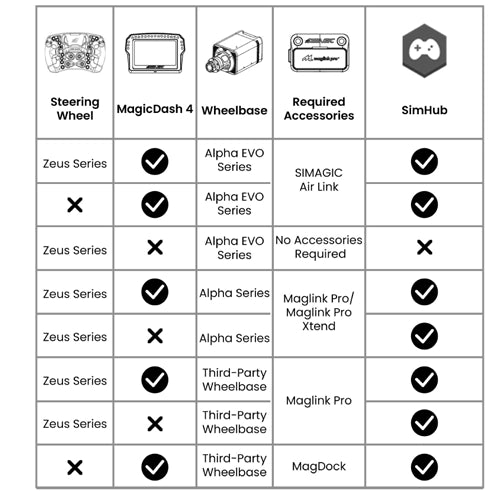
\nDo I need AirLink for my setup?
\nAirLink, When You Need It (and When You Don't)
\nTechnical Specifications
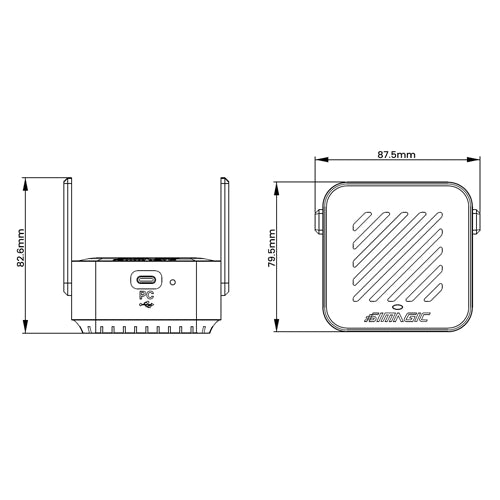
\nAirLink, Full Specifications
\n\nSimagic UP+ Ecosystem
\nAirLink Wireless Hotspot
\nCommon questions
\nAirLink FAQ
\nWhat It Does
\n\nWhat does AirLink do?
\nAirLink is the wireless hotspot that connects your MagicDash 4 to your PC on Alpha EVO setups. Plug it into a USB-C port on your PC, and it creates a proprietary wireless link to the MagicDash 4, transmitting live telemetry from SimHub or SimPro Manager V3 to your dashboard without any cable between the PC and the display. It works whether the MagicDash 4 is mounted on a Zeus wheel or directly on the wheelbase.
\nDoes AirLink use Wi-Fi or Bluetooth?
\nNeither. AirLink runs Simagic's own proprietary wireless protocol, specifically engineered for simulator environments where standard Wi-Fi and Bluetooth signals from PCs, monitors, headsets, and other devices cause interference. The protocol prioritises low-latency, stable bandwidth for telemetry data, and the dual-antenna design optimises range and reliability in cockpit setups.
\nDo I need to buy AirLink separately?
\nIn most cases, no. AirLink is included with every MagicDash 4 purchase, whether bought as a standalone unit or as a bundle with a Zeus wheel. You only need to buy AirLink separately if you're running two or more MagicDash 4 displays on the same rig (each display needs its own AirLink), or as a replacement if your original unit is lost or damaged.
\nSetup & Compatibility
\n\nWhich wheelbases does AirLink work with?
\nAirLink is exclusively for Simagic Alpha EVO Series wheelbases, EVO 9Nm, EVO Pro 12Nm, EVO 18Nm, EVO Ultra 28Nm, and EVO Sport. It is not required for, and does not work with, Alpha Series wheelbases (Alpha Mini, Alpha, Alpha Ultimate, M10) or any third-party wheelbase. Those setups use MagLink Pro or MagDock to connect the MagicDash 4 instead.
\nHow do I set up AirLink?
\nPlug the AirLink into a USB-C port on your PC. Open SimPro Manager V3, it will automatically detect the AirLink and link it to your MagicDash 4. No manual pairing, no driver installation. SimPro Manager V3 also handles firmware updates for AirLink from within the same interface. SimHub works the same way, AirLink is detected automatically once plugged in.
\nCan I mount the MagicDash 4 on the wheelbase instead of the Zeus wheel?
\nYes, on Alpha EVO setups, the MagicDash 4 can be mounted either on the Zeus wheel or directly on the wheelbase, and AirLink handles the wireless connection in both cases. AirLink doesn't care about mount position, it's purely the wireless bridge between your PC and the display. On Alpha Series or third-party bases, a different accessory (MagDock) handles base-mounted displays.
\nCan I run two MagicDash 4 displays with one AirLink?
\nNo, each AirLink pairs with and serves one MagicDash 4. For two simultaneous displays, you need two AirLink units, each plugged into a separate USB port on your PC. Both can run independently with different dashboard layouts and data channels. If you purchase two MagicDash 4 units, each one includes its own AirLink in the box.
\nPurchasing at Player1 Sim Gear
\n\nIs AirLink in stock in Australia?
\nYes, we stock AirLink at our Queensland warehouse as an authorised Simagic dealer. Call 0488 385 870 to confirm current availability before ordering.
\nWhat warranty does AirLink come with?
\nAirLink purchased from Player1 Sim Gear carries Simagic's 2-year manufacturer warranty and is covered by Australian Consumer Law. Warranty claims are handled locally, no international shipping required. Contact us at player1simgear.freshdesk.com or on 0488 385 870.
\nAfter-Sales
\nWarranty & Support
\nSimagic 2-Year Warranty
\nAll Simagic accessories from Player1 Sim Gear carry the manufacturer warranty. Authorised dealer, claims handled locally in Australia.
\nAustralian Consumer Law
\nAll purchases covered by ACL, acceptable quality, fitness for purpose, and statutory rights.
\nLocal Support, 0488 385 870
\nQueensland-based team. Setup help, compatibility questions, and warranty claims handled in Australia.
\nHelp Desk
\nOpen a ticket at player1simgear.freshdesk.com for technical queries or warranty claims.
\nBuild the full experience
\nComplete your sim cockpit
\nPair AirLink and MagicDash 4 with a Zeus Series steering wheel, Simagic Alpha EVO wheelbase, and the rest of your rig.
\n \n\n\n \n \n
\n  \n
\n  \n
\n  \n
\n Not sure if you need AirLink?
\nIf you're buying a MagicDash 4, AirLink is already in the box, you won't need this listing. If you're replacing a lost unit or adding a second display to an Alpha EVO setup, we can confirm exactly what you need before you order.
\n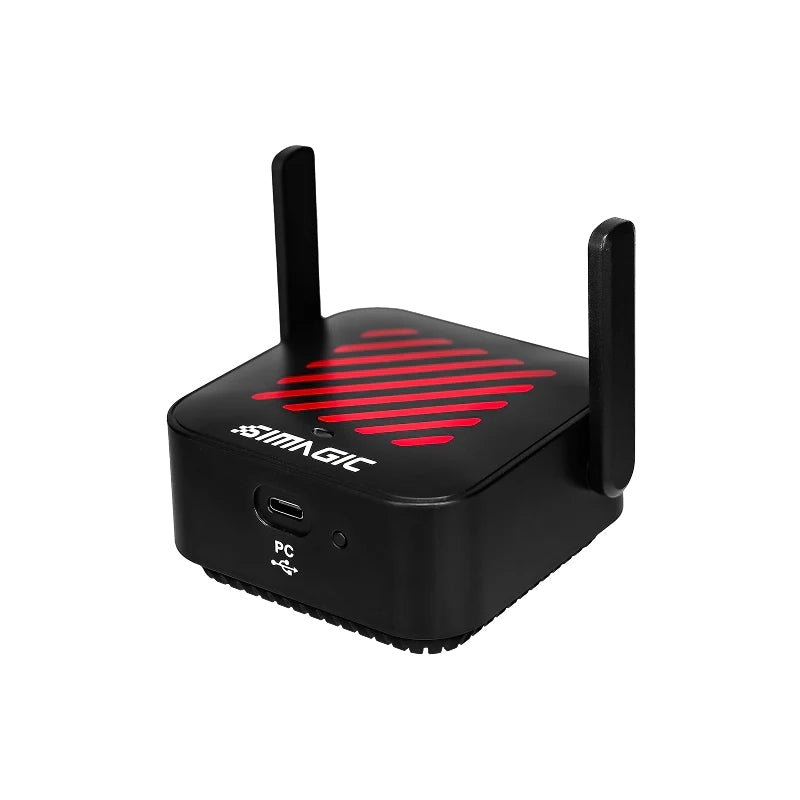
The Story


Product Detail
What AirLink does

Wireless Technology
Proprietary Protocol. Zero Interference.
Dual Antenna · Anti-Interference · Low Latency
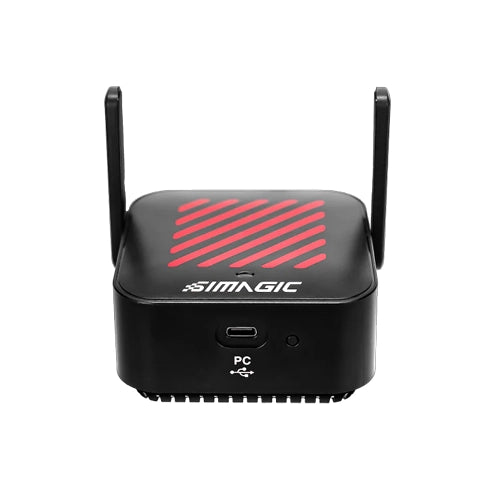
AirLink doesn't use standard Wi-Fi or Bluetooth, it runs Simagic's own proprietary wireless protocol, specifically engineered for simulator environments where other wireless signals can cause interference. Dual integrated antennas and active interference management keep the telemetry feed to your MagicDash 4 stable and consistent throughout your session.
- Proprietary protocol, not Wi-Fi or Bluetooth, purpose-built for sim environments.
- Dual antennas, integrated into the housing for optimal wireless range and stability.
- Anti-interference design, active management for environments with multiple wireless devices.
- Low-latency telemetry, consistent data delivery to the MagicDash 4 in real time.
Simple Setup
Plug into PC. Done.
USB-C to PC · SimHub · SimPro Manager V3
Setup is a one-step process, plug AirLink into a USB-C port on your PC, open SimHub or SimPro Manager V3, and your MagicDash 4 is connected wirelessly. No drivers to install, no pairing sequence. AirLink is recognised automatically by Simagic software and managed through the SimPro Manager V3 device panel for firmware updates and monitoring.
- Included in every MagicDash 4 box, no separate purchase needed for standard setups.
- USB-C to PC, single plug-in on your PC side handles the wireless link to the display.
- Auto-recognised, SimPro Manager V3 detects and manages AirLink automatically.
- Standalone availability, also sold separately for additional displays or as a replacement.


Works With Every EVO Setup
Any Wheelbase. Any Sim. Any Mount.
iRacing · ACC · Assetto Corsa · F1 Series · rFactor 2 · LMU · And More
AirLink works with every Alpha EVO setup that includes a MagicDash 4, whether the display is mounted on a Zeus wheel or directly on the wheelbase. It's the single wireless link between your PC's telemetry software and the display, regardless of sim, wheel, or mounting position.
- All Alpha EVO wheelbases, EVO 9Nm, EVO Pro 12Nm, EVO 18Nm, EVO Ultra 28Nm, EVO Sport.
- All Zeus wheels, Zeus Formula, GT, Sport, with MagicDash 4 wheel-mounted or base-mounted.
- One AirLink per MagicDash 4, running two displays requires two AirLink units.
- All major PC sims, via SimHub (free) or SimPro Manager V3 (free).
Why AirLink
Built for the sim environment.
Proprietary Wireless, Not Bluetooth
AirLink uses Simagic's own wireless protocol rather than generic Bluetooth or Wi-Fi, tuned for the low-latency, high-stability demands of live telemetry in an environment full of competing wireless signals from PCs, headsets, and peripherals.
Managed in SimPro Manager V3
Once plugged in, SimPro Manager V3 automatically detects AirLink and links it to your MagicDash 4. Firmware updates, device monitoring, and wireless signal status are all accessible from within the same interface.
Included, No Extra Cost
AirLink ships in every MagicDash 4 box at no extra cost, whether bought standalone or as a Zeus wheel bundle. You only need to purchase a separate AirLink to run a second MagicDash 4, or as a replacement unit.
Run Multiple Displays
Each AirLink pairs with one MagicDash 4. Running two simultaneous displays, one on the wheel, one on the base, requires two AirLink units, each plugged into a separate USB port. Both run independently with different dashboard layouts.

Quick Reference
Do I need AirLink for my setup?
Technical Specifications
AirLink, Full Specifications
Simagic UP+ Ecosystem
AirLink Wireless Hotspot
Common questions
AirLink FAQ
What It Does
What does AirLink do?
AirLink is the wireless hotspot that connects your MagicDash 4 to your PC on Alpha EVO setups. Plug it into a USB-C port on your PC, and it creates a proprietary wireless link to the MagicDash 4, transmitting live telemetry from SimHub or SimPro Manager V3 to your dashboard without any cable between the PC and the display. It works whether the MagicDash 4 is mounted on a Zeus wheel or directly on the wheelbase.
Does AirLink use Wi-Fi or Bluetooth?
Neither. AirLink runs Simagic's own proprietary wireless protocol, specifically engineered for simulator environments where standard Wi-Fi and Bluetooth signals from PCs, monitors, headsets, and other devices cause interference. The protocol prioritises low-latency, stable bandwidth for telemetry data, and the dual-antenna design optimises range and reliability in cockpit setups.
Do I need to buy AirLink separately?
In most cases, no. AirLink is included with every MagicDash 4 purchase, whether bought as a standalone unit or as a bundle with a Zeus wheel. You only need to buy AirLink separately if you're running two or more MagicDash 4 displays on the same rig (each display needs its own AirLink), or as a replacement if your original unit is lost or damaged.
Setup & Compatibility
Which wheelbases does AirLink work with?
AirLink is exclusively for Simagic Alpha EVO Series wheelbases, EVO 9Nm, EVO Pro 12Nm, EVO 18Nm, EVO Ultra 28Nm, and EVO Sport. It is not required for, and does not work with, Alpha Series wheelbases (Alpha Mini, Alpha, Alpha Ultimate, M10) or any third-party wheelbase. Those setups use MagLink Pro or MagDock to connect the MagicDash 4 instead.
How do I set up AirLink?
Plug the AirLink into a USB-C port on your PC. Open SimPro Manager V3, it will automatically detect the AirLink and link it to your MagicDash 4. No manual pairing, no driver installation. SimPro Manager V3 also handles firmware updates for AirLink from within the same interface. SimHub works the same way, AirLink is detected automatically once plugged in.
Can I mount the MagicDash 4 on the wheelbase instead of the Zeus wheel?
Yes, on Alpha EVO setups, the MagicDash 4 can be mounted either on the Zeus wheel or directly on the wheelbase, and AirLink handles the wireless connection in both cases. AirLink doesn't care about mount position, it's purely the wireless bridge between your PC and the display. On Alpha Series or third-party bases, a different accessory (MagDock) handles base-mounted displays.
Can I run two MagicDash 4 displays with one AirLink?
No, each AirLink pairs with and serves one MagicDash 4. For two simultaneous displays, you need two AirLink units, each plugged into a separate USB port on your PC. Both can run independently with different dashboard layouts and data channels. If you purchase two MagicDash 4 units, each one includes its own AirLink in the box.
Purchasing at Player1 Sim Gear
Is AirLink in stock in Australia?
Yes, we stock AirLink at our Queensland warehouse as an authorised Simagic dealer. Call 0488 385 870 to confirm current availability before ordering.
What warranty does AirLink come with?
AirLink purchased from Player1 Sim Gear carries Simagic's 2-year manufacturer warranty and is covered by Australian Consumer Law. Warranty claims are handled locally, no international shipping required. Contact us at player1simgear.freshdesk.com or on 0488 385 870.
After-Sales
Warranty & Support
Simagic 2-Year Warranty
All Simagic accessories from Player1 Sim Gear carry the manufacturer warranty. Authorised dealer, claims handled locally in Australia.
Australian Consumer Law
All purchases covered by ACL, acceptable quality, fitness for purpose, and statutory rights.
Local Support, 0488 385 870
Queensland-based team. Setup help, compatibility questions, and warranty claims handled in Australia.
Help Desk
Open a ticket at player1simgear.freshdesk.com for technical queries or warranty claims.
Build the full experience
Complete your sim cockpit
Pair AirLink and MagicDash 4 with a Zeus Series steering wheel, Simagic Alpha EVO wheelbase, and the rest of your rig.


Not sure if you need AirLink?
If you're buying a MagicDash 4, AirLink is already in the box, you won't need this listing. If you're replacing a lost unit or adding a second display to an Alpha EVO setup, we can confirm exactly what you need before you order.
Details & Craftsmanship
Every detail has been carefully considered to bring you the perfect product.
Details & Craftsmanship
Every detail has been carefully considered to bring you the perfect product.
Details & Craftsmanship
Every detail has been carefully considered to bring you the perfect product.
Details & Craftsmanship
Every detail has been carefully considered to bring you the perfect product.
Description
Product Detail
What AirLink does
Wireless Technology
Proprietary Protocol. Zero Interference.
Dual Antenna · Anti-Interference · Low Latency
AirLink doesn't use standard Wi-Fi or Bluetooth, it runs Simagic's own proprietary wireless protocol, specifically engineered for simulator environments where other wireless signals can cause interference. Dual integrated antennas and active interference management keep the telemetry feed to your MagicDash 4 stable and consistent throughout your session.
- Proprietary protocol, not Wi-Fi or Bluetooth, purpose-built for sim environments.
- Dual antennas, integrated into the housing for optimal wireless range and stability.
- Anti-interference design, active management for environments with multiple wireless devices.
- Low-latency telemetry, consistent data delivery to the MagicDash 4 in real time.
Simple Setup
Plug into PC. Done.
USB-C to PC · SimHub · SimPro Manager V3
Setup is a one-step process, plug AirLink into a USB-C port on your PC, open SimHub or SimPro Manager V3, and your MagicDash 4 is connected wirelessly. No drivers to install, no pairing sequence. AirLink is recognised automatically by Simagic software and managed through the SimPro Manager V3 device panel for firmware updates and monitoring.
- Included in every MagicDash 4 box, no separate purchase needed for standard setups.
- USB-C to PC, single plug-in on your PC side handles the wireless link to the display.
- Auto-recognised, SimPro Manager V3 detects and manages AirLink automatically.
- Standalone availability, also sold separately for additional displays or as a replacement.
Works With Every EVO Setup
Any Wheelbase. Any Sim. Any Mount.
iRacing · ACC · Assetto Corsa · F1 Series · rFactor 2 · LMU · And More
AirLink works with every Alpha EVO setup that includes a MagicDash 4, whether the display is mounted on a Zeus wheel or directly on the wheelbase. It's the single wireless link between your PC's telemetry software and the display, regardless of sim, wheel, or mounting position.
- All Alpha EVO wheelbases, EVO 9Nm, EVO Pro 12Nm, EVO 18Nm, EVO Ultra 28Nm, EVO Sport.
- All Zeus wheels, Zeus Formula, GT, Sport, with MagicDash 4 wheel-mounted or base-mounted.
- One AirLink per MagicDash 4, running two displays requires two AirLink units.
- All major PC sims, via SimHub (free) or SimPro Manager V3 (free).
Why AirLink
Built for the sim environment.
Proprietary Wireless, Not Bluetooth
AirLink uses Simagic's own wireless protocol rather than generic Bluetooth or Wi-Fi, tuned for the low-latency, high-stability demands of live telemetry in an environment full of competing wireless signals from PCs, headsets, and peripherals.
Managed in SimPro Manager V3
Once plugged in, SimPro Manager V3 automatically detects AirLink and links it to your MagicDash 4. Firmware updates, device monitoring, and wireless signal status are all accessible from within the same interface.
Included, No Extra Cost
AirLink ships in every MagicDash 4 box at no extra cost, whether bought standalone or as a Zeus wheel bundle. You only need to purchase a separate AirLink to run a second MagicDash 4, or as a replacement unit.
Run Multiple Displays
Each AirLink pairs with one MagicDash 4. Running two simultaneous displays, one on the wheel, one on the base, requires two AirLink units, each plugged into a separate USB port. Both run independently with different dashboard layouts.
Quick Reference
Do I need AirLink for my setup?
Technical Specifications
AirLink, Full Specifications
Simagic UP+ Ecosystem
AirLink Wireless Hotspot
Common questions
AirLink FAQ
What It Does
What does AirLink do?
AirLink is the wireless hotspot that connects your MagicDash 4 to your PC on Alpha EVO setups. Plug it into a USB-C port on your PC, and it creates a proprietary wireless link to the MagicDash 4, transmitting live telemetry from SimHub or SimPro Manager V3 to your dashboard without any cable between the PC and the display. It works whether the MagicDash 4 is mounted on a Zeus wheel or directly on the wheelbase.
Does AirLink use Wi-Fi or Bluetooth?
Neither. AirLink runs Simagic's own proprietary wireless protocol, specifically engineered for simulator environments where standard Wi-Fi and Bluetooth signals from PCs, monitors, headsets, and other devices cause interference. The protocol prioritises low-latency, stable bandwidth for telemetry data, and the dual-antenna design optimises range and reliability in cockpit setups.
Do I need to buy AirLink separately?
In most cases, no. AirLink is included with every MagicDash 4 purchase, whether bought as a standalone unit or as a bundle with a Zeus wheel. You only need to buy AirLink separately if you're running two or more MagicDash 4 displays on the same rig (each display needs its own AirLink), or as a replacement if your original unit is lost or damaged.
Setup & Compatibility
Which wheelbases does AirLink work with?
AirLink is exclusively for Simagic Alpha EVO Series wheelbases, EVO 9Nm, EVO Pro 12Nm, EVO 18Nm, EVO Ultra 28Nm, and EVO Sport. It is not required for, and does not work with, Alpha Series wheelbases (Alpha Mini, Alpha, Alpha Ultimate, M10) or any third-party wheelbase. Those setups use MagLink Pro or MagDock to connect the MagicDash 4 instead.
How do I set up AirLink?
Plug the AirLink into a USB-C port on your PC. Open SimPro Manager V3, it will automatically detect the AirLink and link it to your MagicDash 4. No manual pairing, no driver installation. SimPro Manager V3 also handles firmware updates for AirLink from within the same interface. SimHub works the same way, AirLink is detected automatically once plugged in.
Can I mount the MagicDash 4 on the wheelbase instead of the Zeus wheel?
Yes, on Alpha EVO setups, the MagicDash 4 can be mounted either on the Zeus wheel or directly on the wheelbase, and AirLink handles the wireless connection in both cases. AirLink doesn't care about mount position, it's purely the wireless bridge between your PC and the display. On Alpha Series or third-party bases, a different accessory (MagDock) handles base-mounted displays.
Can I run two MagicDash 4 displays with one AirLink?
No, each AirLink pairs with and serves one MagicDash 4. For two simultaneous displays, you need two AirLink units, each plugged into a separate USB port on your PC. Both can run independently with different dashboard layouts and data channels. If you purchase two MagicDash 4 units, each one includes its own AirLink in the box.
Purchasing at Player1 Sim Gear
Is AirLink in stock in Australia?
Yes, we stock AirLink at our Queensland warehouse as an authorised Simagic dealer. Call 0488 385 870 to confirm current availability before ordering.
What warranty does AirLink come with?
AirLink purchased from Player1 Sim Gear carries Simagic's 2-year manufacturer warranty and is covered by Australian Consumer Law. Warranty claims are handled locally, no international shipping required. Contact us at player1simgear.freshdesk.com or on 0488 385 870.
After-Sales
Warranty & Support
Simagic 2-Year Warranty
All Simagic accessories from Player1 Sim Gear carry the manufacturer warranty. Authorised dealer, claims handled locally in Australia.
Australian Consumer Law
All purchases covered by ACL, acceptable quality, fitness for purpose, and statutory rights.
Local Support, 0488 385 870
Queensland-based team. Setup help, compatibility questions, and warranty claims handled in Australia.
Help Desk
Open a ticket at player1simgear.freshdesk.com for technical queries or warranty claims.
Build the full experience
Complete your sim cockpit
Pair AirLink and MagicDash 4 with a Zeus Series steering wheel, Simagic Alpha EVO wheelbase, and the rest of your rig.
Not sure if you need AirLink?
If you're buying a MagicDash 4, AirLink is already in the box, you won't need this listing. If you're replacing a lost unit or adding a second display to an Alpha EVO setup, we can confirm exactly what you need before you order.