Quick Reference
\nDo I need MagDock for my setup?
\nMagDock, When You Need It (and When You Don't)
\nTechnical Specifications
\nMagDock, Full Specifications
\n\nSimagic UP+ Ecosystem
\nMagDock Dashboard Mount
\nCommon questions
\nMagDock FAQ
\nWhat It Does
\n\nWhat does MagDock do?
\nMagDock is the complete mounting and connection solution for the MagicDash 4 on Alpha Series and third-party wheelbases. It does two things: it physically mounts the MagicDash 4 to your wheelbase or rig via a magnetic snap-on stand, and it connects the display to your PC via its built-in MagLink Pro Hub and a single USB-C cable. MagDock replaces what would otherwise require both a separate mount and a separate MagLink Pro Hub.
\nDoes MagDock include a MagLink Pro Hub?
\nYes, MagDock has a MagLink Pro Hub built directly into the unit. You do not need to purchase a separate MagLink Pro to use MagicDash 4 with MagDock. The hub provides data and power to the MagicDash 4 via a single USB-C cable from MagDock to your PC, with an independent power switch and status indicator on the unit body.
\nDo I need MagDock for my Alpha EVO wheelbase?
\nNo. Alpha EVO wheelbases connect the MagicDash 4 wirelessly via the AirLink hotspot, MagDock is not needed and is not compatible with Alpha EVO setups. MagDock is specifically for Alpha Series wheelbases (Alpha Mini, Alpha, Alpha Ultimate, M10) and third-party wheelbases including Simucube, MOZA, Fanatec, VRS, Asetek, and Cammus.
\nSetup & Compatibility
\n\nHow do I set up MagDock?
\nMount MagDock to your wheelbase using the included hardware (compatible with standard front mounting holes on Alpha Series and most third-party bases). Connect the USB-C cable from MagDock to your PC. The MagicDash 4 snaps magnetically onto the mount plate and powers on automatically when the MagDock hub is switched on. Open SimPro Manager V3 or SimHub, both detect MagDock and MagicDash 4 automatically. No driver installation required.
\nWhich wheelbases is MagDock compatible with?
\nMagDock is compatible with all Simagic Alpha Series wheelbases (Alpha Mini, Alpha, Alpha Ultimate, M10) and most third-party wheelbases that have standard front mounting holes, including Simucube, MOZA, Fanatec, VRS, Asetek, and Cammus. It is not compatible with Alpha EVO Series wheelbases, which connect MagicDash 4 via AirLink instead.
\nI have a Zeus wheel on an Alpha Series or third-party base, do I need MagDock?
\nIt depends on where you want to mount the MagicDash 4. MagLink Pro is always required to connect your Zeus wheel to the base. For the MagicDash 4: if you want it mounted on the Zeus wheel itself, MagLink Pro handles that too, no MagDock needed. If you want it mounted on the wheelbase as a fixed cockpit display (independent of the wheel), then MagDock is required for that display. If you want both, one on the wheel and one on the base, you need MagLink Pro, MagDock, and two MagicDash 4 units.
\nCan I mount the MagicDash 4 on my wheelbase instead of on the Zeus wheel?
\nYes. The MagicDash 4 can be mounted directly on your wheelbase using MagDock, independent of your Zeus wheel entirely. This gives you a fixed dashboard position that stays in place regardless of steering input, which some drivers prefer for visibility. On Alpha Series and third-party bases, MagDock is the required accessory for this. On Alpha EVO bases, the MagicDash 4 connects wirelessly via AirLink so no MagDock is needed regardless of mount position.
\nCan I run a MagicDash 4 on my Zeus wheel AND a second one on the wheelbase?
\nYes, you can run two MagicDash 4 units simultaneously, each showing independent data. On Alpha Series or third-party bases: you need MagLink Pro for the wheel-mounted display and MagDock for the base-mounted display, plus two MagicDash 4 units. On Alpha EVO bases: each MagicDash 4 needs its own AirLink wireless hotspot, which is included in every MagicDash 4 box, no MagDock required.
\nCan I run MagDock with SimHub?
\nYes. SimHub detects and communicates with MagicDash 4 through MagDock automatically once the unit is plugged in and powered. Full SimHub dashboard library access, custom layouts, and all telemetry channels work normally. SimPro Manager V3 is also supported for official Simagic preset dashboards and firmware management.
\nPurchasing at Player1 Sim Gear
\n\nIs MagDock in stock in Australia?
\nYes, we stock MagDock at our Queensland warehouse as an authorised Simagic dealer. Call 0488 385 870 to confirm current availability before ordering.
\nWhat warranty does MagDock come with?
\nMagDock purchased from Player1 Sim Gear carries Simagic's 2-year manufacturer warranty and is covered by Australian Consumer Law. Warranty claims are handled locally, no international shipping required. Contact us at player1simgear.freshdesk.com or on 0488 385 870.
\nAfter-Sales
\nWarranty & Support
\nSimagic 2-Year Warranty
\nAll Simagic accessories from Player1 Sim Gear carry the manufacturer warranty. Authorised dealer, claims handled locally in Australia.
\nAustralian Consumer Law
\nAll purchases covered by ACL, acceptable quality, fitness for purpose, and statutory rights.
\nLocal Support, 0488 385 870
\nQueensland-based team. Setup help, compatibility questions, and warranty claims handled in Australia.
\nHelp Desk
\nOpen a ticket at player1simgear.freshdesk.com for technical queries or warranty claims.
\nBuild the full experience
\nComplete your sim cockpit
\nPair MagDock and MagicDash 4 with a Zeus Series steering wheel, Simagic wheelbase, and the rest of your rig.
\n \n\n\n \n \n
\n  \n
\n  \n
\n  \n
\n Not sure if MagDock is right for you?
\nIf you're on an Alpha EVO, you don't need MagDock, AirLink is included with your MagicDash 4. If you're on an Alpha Series or third-party base, MagDock is what you need. Not sure? We can confirm your exact requirements before you order.
\n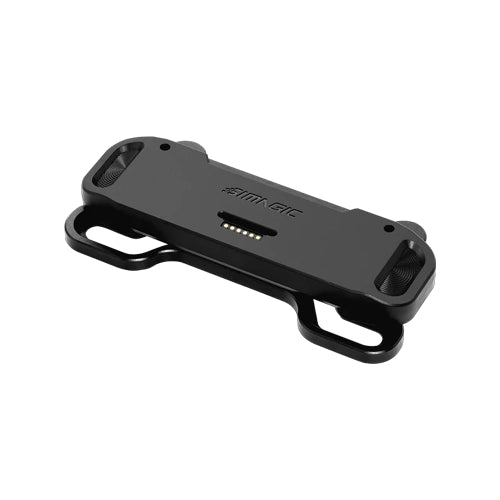
Original: $75.00
-65%$75.00
$26.25The Story


Product Detail
What MagDock does

All-in-one solution
Mount, Hub, Connection, One Unit.
Magnetic Mount · Integrated MagLink Pro Hub · USB-C to PC
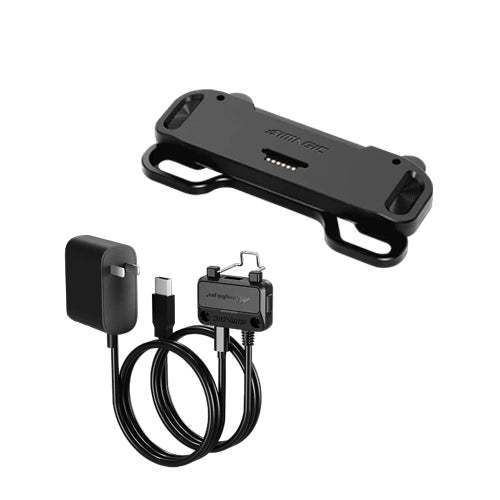
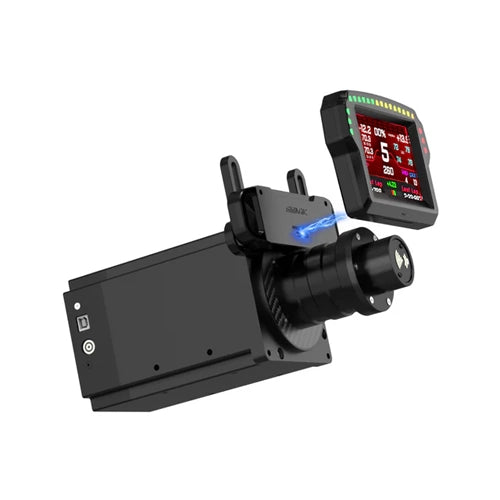
MagDock solves two problems at once: it mounts the MagicDash 4 onto your wheelbase or rig, and it handles the data and power connection to your PC, all in one accessory. The built-in MagLink Pro Hub means you don't need to buy a separate MagLink Pro alongside MagDock. Plug a single USB-C cable from MagDock to your PC, and the MagicDash 4 is live.
- Integrated MagLink Pro Hub, no separate hub purchase required; everything is built in.
- Magnetic snap-on mount, MagicDash 4 attaches and aligns automatically, holds firm throughout sessions.
- Independent power switch, dedicated switch and status indicator on the hub body.
- Anti-detachment buckle, flip-latch locking plug prevents the data cable working loose during intense stints.
Build Quality
Precision-Machined. Height-Adjustable.
Aluminium Alloy · ABS · Carbon Fibre · Adjustable Stand
MagDock is built from a combination of CNC-machined aluminium alloy, ABS and carbon fibre, materials that keep the display stable and vibration-free at any force feedback setting. The height-adjustable stand lets you set the exact screen position for your seating and monitor arrangement: loosen two screws, slide to height, lock back in. Once set, it stays.
- CNC aluminium alloy, precision-machined chassis resists flex and vibration from high-torque wheelbases.
- Carbon fibre finish, clean cockpit aesthetic that matches sim racing rig styling.
- Height-adjustable stand, two-screw adjustment lets you dial in perfect screen height for your seating position.
- Secure magnetic release, MagicDash 4 detaches cleanly for storage or transport without tools.


Universal Compatibility
Alpha Series. Third-Party. Any Wheelbase.
Alpha Mini · Alpha · Alpha Ultimate · Simucube · MOZA · Fanatec · VRS · Asetek · Cammus
MagDock is the accessory that opens MagicDash 4 to any sim rig. It mounts directly to Simagic Alpha Series wheelbases, and fits most third-party wheelbases via standard front mounting holes, including Simucube, MOZA, Fanatec, VRS, Asetek, and Cammus. Note that Alpha EVO wheelbases connect MagicDash 4 directly without MagDock, MagDock is for Alpha Series and third-party bases only.
- Alpha Series, Alpha Mini, Alpha, Alpha Ultimate: native direct mount.
- Third-party wheelbases, Simucube, MOZA, Fanatec, VRS, Asetek, Cammus, and more.
- Standard mounting holes, fits most wheelbase front-face mounting patterns without adapters.
- Not required for Alpha EVO, EVO bases connect MagicDash 4 directly via AirLink; MagDock is not needed.
Why MagDock
Everything you need. Nothing you don't.
MagLink Pro Hub Already Included
MagDock has the MagLink Pro Hub built in, you don't need to buy a separate hub. The hub handles data and power to the MagicDash 4 via a single USB-C cable to your PC, with its own power switch and status indicator on the unit.
Magnetic Snap, Secure and Fast
The MagicDash 4 attaches to MagDock magnetically, it self-aligns on contact and holds firm under vibration from any wheelbase torque setting. For removal, it releases cleanly without tools and can be re-mounted in under a second.
Set Your Height, Lock It In
The MagDock stand is height-adjustable, loosen two screws to slide the display up or down, then lock. Whether your rig has a low-slung seating position or a more upright GT cockpit setup, MagDock positions the MagicDash 4 exactly where you need it.
SimHub & SimPro Manager V3 Ready
Once plugged in, MagDock and MagicDash 4 are detected automatically by SimPro Manager V3 and SimHub. Official Simagic dashboard presets, full community SimHub layout library, custom telemetry channels, all work out of the box.

Quick Reference
Do I need MagDock for my setup?
Technical Specifications
MagDock, Full Specifications
Simagic UP+ Ecosystem
MagDock Dashboard Mount
Common questions
MagDock FAQ
What It Does
What does MagDock do?
MagDock is the complete mounting and connection solution for the MagicDash 4 on Alpha Series and third-party wheelbases. It does two things: it physically mounts the MagicDash 4 to your wheelbase or rig via a magnetic snap-on stand, and it connects the display to your PC via its built-in MagLink Pro Hub and a single USB-C cable. MagDock replaces what would otherwise require both a separate mount and a separate MagLink Pro Hub.
Does MagDock include a MagLink Pro Hub?
Yes, MagDock has a MagLink Pro Hub built directly into the unit. You do not need to purchase a separate MagLink Pro to use MagicDash 4 with MagDock. The hub provides data and power to the MagicDash 4 via a single USB-C cable from MagDock to your PC, with an independent power switch and status indicator on the unit body.
Do I need MagDock for my Alpha EVO wheelbase?
No. Alpha EVO wheelbases connect the MagicDash 4 wirelessly via the AirLink hotspot, MagDock is not needed and is not compatible with Alpha EVO setups. MagDock is specifically for Alpha Series wheelbases (Alpha Mini, Alpha, Alpha Ultimate, M10) and third-party wheelbases including Simucube, MOZA, Fanatec, VRS, Asetek, and Cammus.
Setup & Compatibility
How do I set up MagDock?
Mount MagDock to your wheelbase using the included hardware (compatible with standard front mounting holes on Alpha Series and most third-party bases). Connect the USB-C cable from MagDock to your PC. The MagicDash 4 snaps magnetically onto the mount plate and powers on automatically when the MagDock hub is switched on. Open SimPro Manager V3 or SimHub, both detect MagDock and MagicDash 4 automatically. No driver installation required.
Which wheelbases is MagDock compatible with?
MagDock is compatible with all Simagic Alpha Series wheelbases (Alpha Mini, Alpha, Alpha Ultimate, M10) and most third-party wheelbases that have standard front mounting holes, including Simucube, MOZA, Fanatec, VRS, Asetek, and Cammus. It is not compatible with Alpha EVO Series wheelbases, which connect MagicDash 4 via AirLink instead.
I have a Zeus wheel on an Alpha Series or third-party base, do I need MagDock?
It depends on where you want to mount the MagicDash 4. MagLink Pro is always required to connect your Zeus wheel to the base. For the MagicDash 4: if you want it mounted on the Zeus wheel itself, MagLink Pro handles that too, no MagDock needed. If you want it mounted on the wheelbase as a fixed cockpit display (independent of the wheel), then MagDock is required for that display. If you want both, one on the wheel and one on the base, you need MagLink Pro, MagDock, and two MagicDash 4 units.
Can I mount the MagicDash 4 on my wheelbase instead of on the Zeus wheel?
Yes. The MagicDash 4 can be mounted directly on your wheelbase using MagDock, independent of your Zeus wheel entirely. This gives you a fixed dashboard position that stays in place regardless of steering input, which some drivers prefer for visibility. On Alpha Series and third-party bases, MagDock is the required accessory for this. On Alpha EVO bases, the MagicDash 4 connects wirelessly via AirLink so no MagDock is needed regardless of mount position.
Can I run a MagicDash 4 on my Zeus wheel AND a second one on the wheelbase?
Yes, you can run two MagicDash 4 units simultaneously, each showing independent data. On Alpha Series or third-party bases: you need MagLink Pro for the wheel-mounted display and MagDock for the base-mounted display, plus two MagicDash 4 units. On Alpha EVO bases: each MagicDash 4 needs its own AirLink wireless hotspot, which is included in every MagicDash 4 box, no MagDock required.
Can I run MagDock with SimHub?
Yes. SimHub detects and communicates with MagicDash 4 through MagDock automatically once the unit is plugged in and powered. Full SimHub dashboard library access, custom layouts, and all telemetry channels work normally. SimPro Manager V3 is also supported for official Simagic preset dashboards and firmware management.
Purchasing at Player1 Sim Gear
Is MagDock in stock in Australia?
Yes, we stock MagDock at our Queensland warehouse as an authorised Simagic dealer. Call 0488 385 870 to confirm current availability before ordering.
What warranty does MagDock come with?
MagDock purchased from Player1 Sim Gear carries Simagic's 2-year manufacturer warranty and is covered by Australian Consumer Law. Warranty claims are handled locally, no international shipping required. Contact us at player1simgear.freshdesk.com or on 0488 385 870.
After-Sales
Warranty & Support
Simagic 2-Year Warranty
All Simagic accessories from Player1 Sim Gear carry the manufacturer warranty. Authorised dealer, claims handled locally in Australia.
Australian Consumer Law
All purchases covered by ACL, acceptable quality, fitness for purpose, and statutory rights.
Local Support, 0488 385 870
Queensland-based team. Setup help, compatibility questions, and warranty claims handled in Australia.
Help Desk
Open a ticket at player1simgear.freshdesk.com for technical queries or warranty claims.
Build the full experience
Complete your sim cockpit
Pair MagDock and MagicDash 4 with a Zeus Series steering wheel, Simagic wheelbase, and the rest of your rig.


Not sure if MagDock is right for you?
If you're on an Alpha EVO, you don't need MagDock, AirLink is included with your MagicDash 4. If you're on an Alpha Series or third-party base, MagDock is what you need. Not sure? We can confirm your exact requirements before you order.
Details & Craftsmanship
Every detail has been carefully considered to bring you the perfect product.
Details & Craftsmanship
Every detail has been carefully considered to bring you the perfect product.
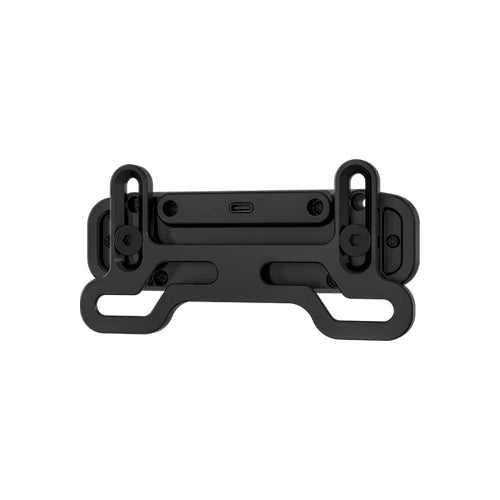
Details & Craftsmanship
Every detail has been carefully considered to bring you the perfect product.
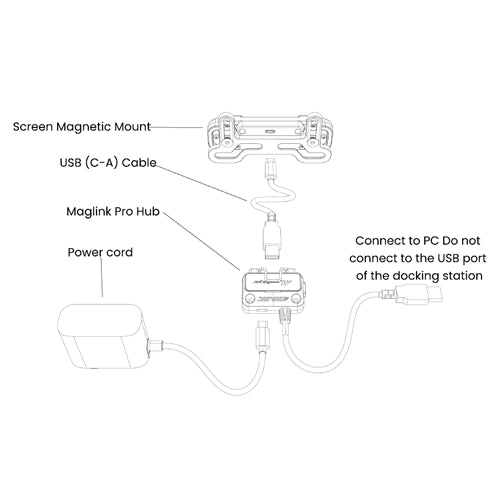
Details & Craftsmanship
Every detail has been carefully considered to bring you the perfect product.
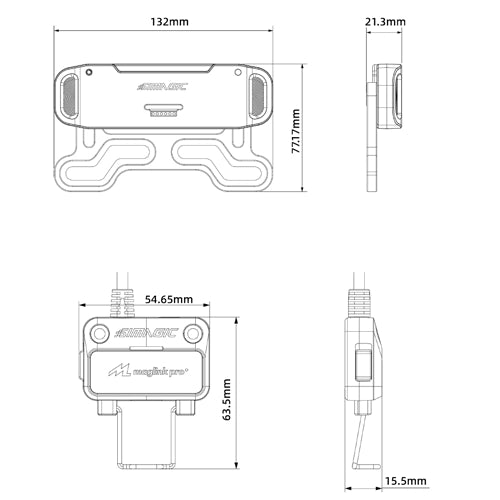
Details & Craftsmanship
Every detail has been carefully considered to bring you the perfect product.
Description
Product Detail
What MagDock does
All-in-one solution
Mount, Hub, Connection, One Unit.
Magnetic Mount · Integrated MagLink Pro Hub · USB-C to PC
MagDock solves two problems at once: it mounts the MagicDash 4 onto your wheelbase or rig, and it handles the data and power connection to your PC, all in one accessory. The built-in MagLink Pro Hub means you don't need to buy a separate MagLink Pro alongside MagDock. Plug a single USB-C cable from MagDock to your PC, and the MagicDash 4 is live.
- Integrated MagLink Pro Hub, no separate hub purchase required; everything is built in.
- Magnetic snap-on mount, MagicDash 4 attaches and aligns automatically, holds firm throughout sessions.
- Independent power switch, dedicated switch and status indicator on the hub body.
- Anti-detachment buckle, flip-latch locking plug prevents the data cable working loose during intense stints.
Build Quality
Precision-Machined. Height-Adjustable.
Aluminium Alloy · ABS · Carbon Fibre · Adjustable Stand
MagDock is built from a combination of CNC-machined aluminium alloy, ABS and carbon fibre, materials that keep the display stable and vibration-free at any force feedback setting. The height-adjustable stand lets you set the exact screen position for your seating and monitor arrangement: loosen two screws, slide to height, lock back in. Once set, it stays.
- CNC aluminium alloy, precision-machined chassis resists flex and vibration from high-torque wheelbases.
- Carbon fibre finish, clean cockpit aesthetic that matches sim racing rig styling.
- Height-adjustable stand, two-screw adjustment lets you dial in perfect screen height for your seating position.
- Secure magnetic release, MagicDash 4 detaches cleanly for storage or transport without tools.
Universal Compatibility
Alpha Series. Third-Party. Any Wheelbase.
Alpha Mini · Alpha · Alpha Ultimate · Simucube · MOZA · Fanatec · VRS · Asetek · Cammus
MagDock is the accessory that opens MagicDash 4 to any sim rig. It mounts directly to Simagic Alpha Series wheelbases, and fits most third-party wheelbases via standard front mounting holes, including Simucube, MOZA, Fanatec, VRS, Asetek, and Cammus. Note that Alpha EVO wheelbases connect MagicDash 4 directly without MagDock, MagDock is for Alpha Series and third-party bases only.
- Alpha Series, Alpha Mini, Alpha, Alpha Ultimate: native direct mount.
- Third-party wheelbases, Simucube, MOZA, Fanatec, VRS, Asetek, Cammus, and more.
- Standard mounting holes, fits most wheelbase front-face mounting patterns without adapters.
- Not required for Alpha EVO, EVO bases connect MagicDash 4 directly via AirLink; MagDock is not needed.
Why MagDock
Everything you need. Nothing you don't.
MagLink Pro Hub Already Included
MagDock has the MagLink Pro Hub built in, you don't need to buy a separate hub. The hub handles data and power to the MagicDash 4 via a single USB-C cable to your PC, with its own power switch and status indicator on the unit.
Magnetic Snap, Secure and Fast
The MagicDash 4 attaches to MagDock magnetically, it self-aligns on contact and holds firm under vibration from any wheelbase torque setting. For removal, it releases cleanly without tools and can be re-mounted in under a second.
Set Your Height, Lock It In
The MagDock stand is height-adjustable, loosen two screws to slide the display up or down, then lock. Whether your rig has a low-slung seating position or a more upright GT cockpit setup, MagDock positions the MagicDash 4 exactly where you need it.
SimHub & SimPro Manager V3 Ready
Once plugged in, MagDock and MagicDash 4 are detected automatically by SimPro Manager V3 and SimHub. Official Simagic dashboard presets, full community SimHub layout library, custom telemetry channels, all work out of the box.
Quick Reference
Do I need MagDock for my setup?
Technical Specifications
MagDock, Full Specifications
Simagic UP+ Ecosystem
MagDock Dashboard Mount
Common questions
MagDock FAQ
What It Does
What does MagDock do?
MagDock is the complete mounting and connection solution for the MagicDash 4 on Alpha Series and third-party wheelbases. It does two things: it physically mounts the MagicDash 4 to your wheelbase or rig via a magnetic snap-on stand, and it connects the display to your PC via its built-in MagLink Pro Hub and a single USB-C cable. MagDock replaces what would otherwise require both a separate mount and a separate MagLink Pro Hub.
Does MagDock include a MagLink Pro Hub?
Yes, MagDock has a MagLink Pro Hub built directly into the unit. You do not need to purchase a separate MagLink Pro to use MagicDash 4 with MagDock. The hub provides data and power to the MagicDash 4 via a single USB-C cable from MagDock to your PC, with an independent power switch and status indicator on the unit body.
Do I need MagDock for my Alpha EVO wheelbase?
No. Alpha EVO wheelbases connect the MagicDash 4 wirelessly via the AirLink hotspot, MagDock is not needed and is not compatible with Alpha EVO setups. MagDock is specifically for Alpha Series wheelbases (Alpha Mini, Alpha, Alpha Ultimate, M10) and third-party wheelbases including Simucube, MOZA, Fanatec, VRS, Asetek, and Cammus.
Setup & Compatibility
How do I set up MagDock?
Mount MagDock to your wheelbase using the included hardware (compatible with standard front mounting holes on Alpha Series and most third-party bases). Connect the USB-C cable from MagDock to your PC. The MagicDash 4 snaps magnetically onto the mount plate and powers on automatically when the MagDock hub is switched on. Open SimPro Manager V3 or SimHub, both detect MagDock and MagicDash 4 automatically. No driver installation required.
Which wheelbases is MagDock compatible with?
MagDock is compatible with all Simagic Alpha Series wheelbases (Alpha Mini, Alpha, Alpha Ultimate, M10) and most third-party wheelbases that have standard front mounting holes, including Simucube, MOZA, Fanatec, VRS, Asetek, and Cammus. It is not compatible with Alpha EVO Series wheelbases, which connect MagicDash 4 via AirLink instead.
I have a Zeus wheel on an Alpha Series or third-party base, do I need MagDock?
It depends on where you want to mount the MagicDash 4. MagLink Pro is always required to connect your Zeus wheel to the base. For the MagicDash 4: if you want it mounted on the Zeus wheel itself, MagLink Pro handles that too, no MagDock needed. If you want it mounted on the wheelbase as a fixed cockpit display (independent of the wheel), then MagDock is required for that display. If you want both, one on the wheel and one on the base, you need MagLink Pro, MagDock, and two MagicDash 4 units.
Can I mount the MagicDash 4 on my wheelbase instead of on the Zeus wheel?
Yes. The MagicDash 4 can be mounted directly on your wheelbase using MagDock, independent of your Zeus wheel entirely. This gives you a fixed dashboard position that stays in place regardless of steering input, which some drivers prefer for visibility. On Alpha Series and third-party bases, MagDock is the required accessory for this. On Alpha EVO bases, the MagicDash 4 connects wirelessly via AirLink so no MagDock is needed regardless of mount position.
Can I run a MagicDash 4 on my Zeus wheel AND a second one on the wheelbase?
Yes, you can run two MagicDash 4 units simultaneously, each showing independent data. On Alpha Series or third-party bases: you need MagLink Pro for the wheel-mounted display and MagDock for the base-mounted display, plus two MagicDash 4 units. On Alpha EVO bases: each MagicDash 4 needs its own AirLink wireless hotspot, which is included in every MagicDash 4 box, no MagDock required.
Can I run MagDock with SimHub?
Yes. SimHub detects and communicates with MagicDash 4 through MagDock automatically once the unit is plugged in and powered. Full SimHub dashboard library access, custom layouts, and all telemetry channels work normally. SimPro Manager V3 is also supported for official Simagic preset dashboards and firmware management.
Purchasing at Player1 Sim Gear
Is MagDock in stock in Australia?
Yes, we stock MagDock at our Queensland warehouse as an authorised Simagic dealer. Call 0488 385 870 to confirm current availability before ordering.
What warranty does MagDock come with?
MagDock purchased from Player1 Sim Gear carries Simagic's 2-year manufacturer warranty and is covered by Australian Consumer Law. Warranty claims are handled locally, no international shipping required. Contact us at player1simgear.freshdesk.com or on 0488 385 870.
After-Sales
Warranty & Support
Simagic 2-Year Warranty
All Simagic accessories from Player1 Sim Gear carry the manufacturer warranty. Authorised dealer, claims handled locally in Australia.
Australian Consumer Law
All purchases covered by ACL, acceptable quality, fitness for purpose, and statutory rights.
Local Support, 0488 385 870
Queensland-based team. Setup help, compatibility questions, and warranty claims handled in Australia.
Help Desk
Open a ticket at player1simgear.freshdesk.com for technical queries or warranty claims.
Build the full experience
Complete your sim cockpit
Pair MagDock and MagicDash 4 with a Zeus Series steering wheel, Simagic wheelbase, and the rest of your rig.
Not sure if MagDock is right for you?
If you're on an Alpha EVO, you don't need MagDock, AirLink is included with your MagicDash 4. If you're on an Alpha Series or third-party base, MagDock is what you need. Not sure? We can confirm your exact requirements before you order.