Common questions
\nMagLink Pro FAQ
\nWhat It Does
\n\nWhat does MagLink Pro do?
\nMagLink Pro is the adapter that connects Zeus Series wheels to non-Alpha-EVO wheelbases, Simagic Alpha Series, M10, Simucube, MOZA, Fanatec, VRS, Asetek, and other third-party direct drive bases. It mounts to the wheelbase shaft via the included mounting plate, connects to the Zeus wheel via a coiled cable, and passes all inputs, RGB shift lights, and SimHub/SimPro V3 data to your PC via USB. Every feature of your Zeus wheel is fully retained.
\nDo I need MagLink Pro for an Alpha EVO base?
\nNo. Zeus wheels connect natively to all Alpha EVO series bases, Alpha EVO 9Nm, Alpha EVO Pro 18Nm, Alpha EVO Ultra, and Alpha EVO Sport, with no adapter needed. MagLink Pro is only required for Alpha Mini, Alpha, Alpha Ultimate, M10, and all third-party bases.
\nWhat is the difference between MagLink Pro and MagLink Pro Xtend?
\nMagLink Pro uses a wired USB connection and is for connecting Zeus wheels to non-EVO wheelbases. MagLink Pro Xtend provides wireless connectivity and is specifically for wireless Zeus/Neo X wheel connections on Alpha Series bases, or for running a standalone MagicDash 4 (without a Zeus wheel) on any non-EVO rig. If you want a Zeus wheel on your MOZA or Simucube base, standard MagLink Pro is all you need.
\nSetup & Compatibility
\n\nWhat wheelbases is MagLink Pro compatible with?
\nMagLink Pro works with: Simagic Alpha Series (Alpha Mini, Alpha, Alpha Ultimate, M10); Simucube 2 (Sport, Pro, Ultimate); MOZA (R5, R9, R12, R16, R21); Fanatec (CSL DD, CSL DD Pro, Podium DD1, Podium DD2); VRS (DirectForce Pro); Asetek (Forte, Invicta); and most other third-party direct drive bases with standard USB connectivity. Call 0488 385 870 to confirm your specific model before ordering.
\nDoes MagLink Pro work with MagicDash 4?
\nMagLink Pro enables Zeus wheel functionality on non-EVO bases. For MagicDash 4 support on those same bases, MagDock (sold separately) is also required. MagLink Pro alone does not enable the MagicDash 4 dashboard, MagDock handles the physical mount and dashboard data connection on Alpha Series and third-party bases.
\nDoes MagLink Pro work with SimHub?
\nYes, all SimHub functionality is fully retained through MagLink Pro. Button remapping, RGB shift light configuration, telemetry-linked encoder lighting, and MagicDash 4 dashboard display all work via SimHub exactly as they do on a native Alpha EVO connection.
\nPurchasing at Player1 Sim Gear
\n\nIs MagLink Pro in stock in Australia?
\nYes, we stock MagLink Pro at our Queensland warehouse as an authorised Simagic dealer. Call 0488 385 870 to confirm availability before ordering.
\nWhat warranty does MagLink Pro come with?
\nMagLink Pro purchased from Player1 Sim Gear carries Simagic's 2-year manufacturer warranty and is covered by Australian Consumer Law. Warranty claims are handled locally, no international shipping required. Contact us at player1simgear.freshdesk.com or on 0488 385 870.
\nAfter-Sales
\nWarranty & Support
\nSimagic 2-Year Warranty
\nAll Simagic accessories from Player1 Sim Gear carry the manufacturer warranty. Authorised dealer, claims handled locally in Australia.
\nAustralian Consumer Law
\nAll purchases covered by ACL, acceptable quality, fitness for purpose, and statutory rights.
\nLocal Support, 0488 385 870
\nQueensland-based team. Setup help, compatibility questions, and warranty claims handled in Australia.
\nHelp Desk
\nOpen a ticket at player1simgear.freshdesk.com for technical queries or warranty claims.
\nBuild the full experience
\nComplete your sim cockpit
\nPair MagLink Pro with a Zeus Series wheel and MagicDash 4 to complete the full Simagic UP+ ecosystem on your base.
\n \n
\n Simagic Full Range
\nWheelbases, wheels, pedals & more
\nShop Simagic →
\n \n
\n Zeus Rims & Accessories
\nMagicDash 4, MagDock, MagLink Pro
\nShop Zeus Accessories →
\n \n
\n Sim Cockpits
\nRacing cockpit frames & rigs
\nShop Cockpits →
\n \n
\n VR Headsets
\nPimax Crystal Super, Crystal Light & more
\nShop VR →
\nNot sure if MagLink Pro works with your wheelbase?
\nGive us your wheelbase model and we'll confirm compatibility before you order. We can also advise on whether you need MagDock alongside MagLink Pro for MagicDash 4 support.
\n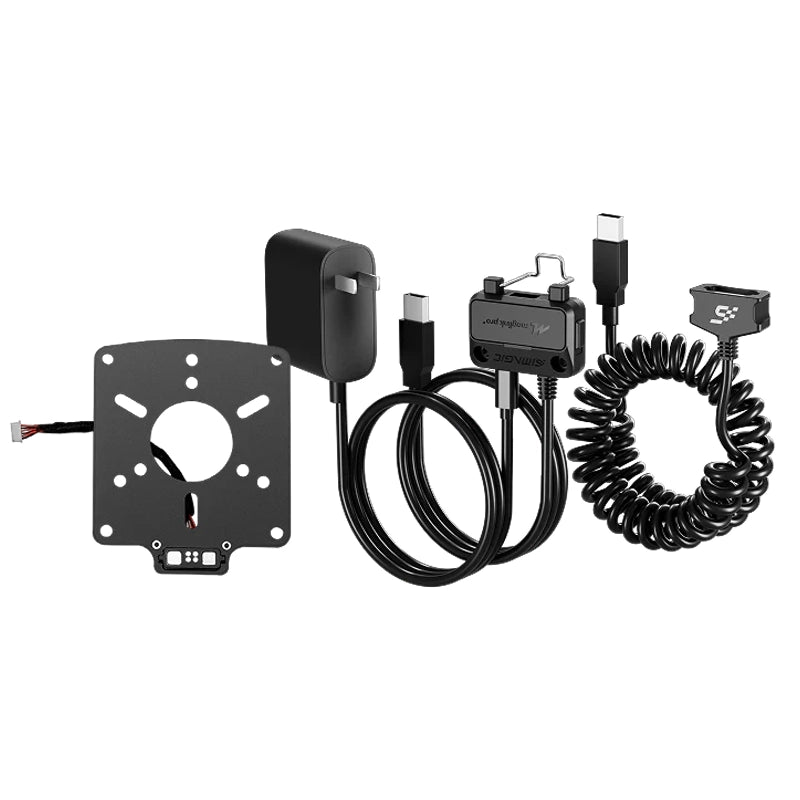
The Story


Product Detail
What MagLink Pro does

Wireless Technology
Proprietary Protocol. Zero Interference.
Dual Antenna · Anti-Interference · Low Latency
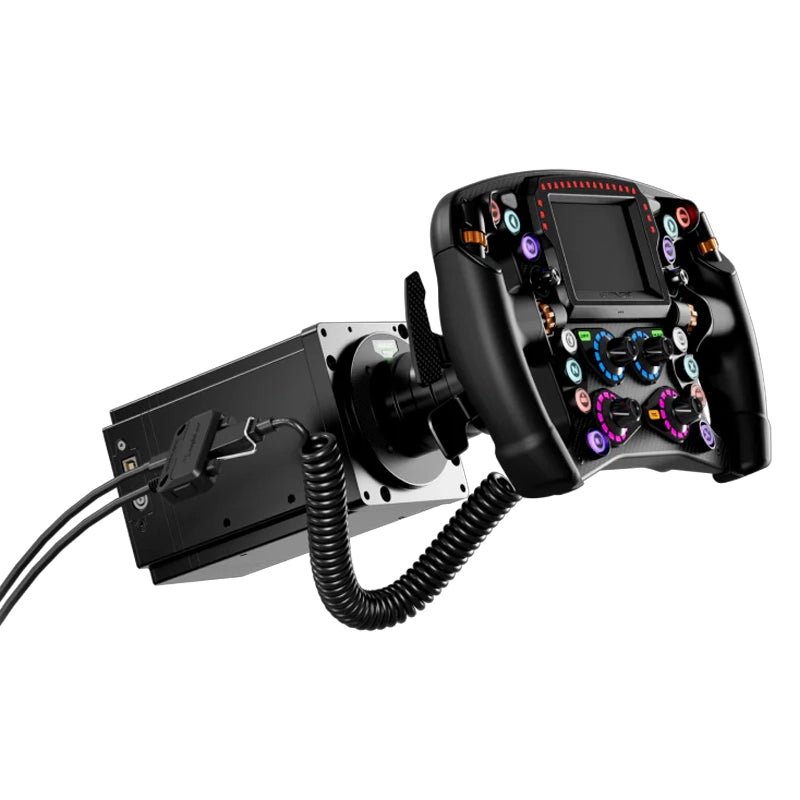
Zeus wheels connect natively to Alpha EVO bases, but for everyone else, MagLink Pro is the bridge. It mounts to the wheelbase shaft, connects via the coiled cable to the wheel, and passes all data through USB to your PC. Every button, rotary, encoder, shift light, and SimHub feature works exactly as it would on a native Alpha EVO connection.
- Proprietary protocol, not Wi-Fi or Bluetooth, purpose-built for sim environments.
- Dual antennas, integrated into the housing for optimal wireless range and stability.
- Anti-interference design, active management for environments with multiple wireless devices.
- Low-latency telemetry, consistent data delivery to the MagicDash 4 display in real time.
Simple Setup
Plug into PC. Done.
USB-C to PC · SimHub · SimPro Manager V3
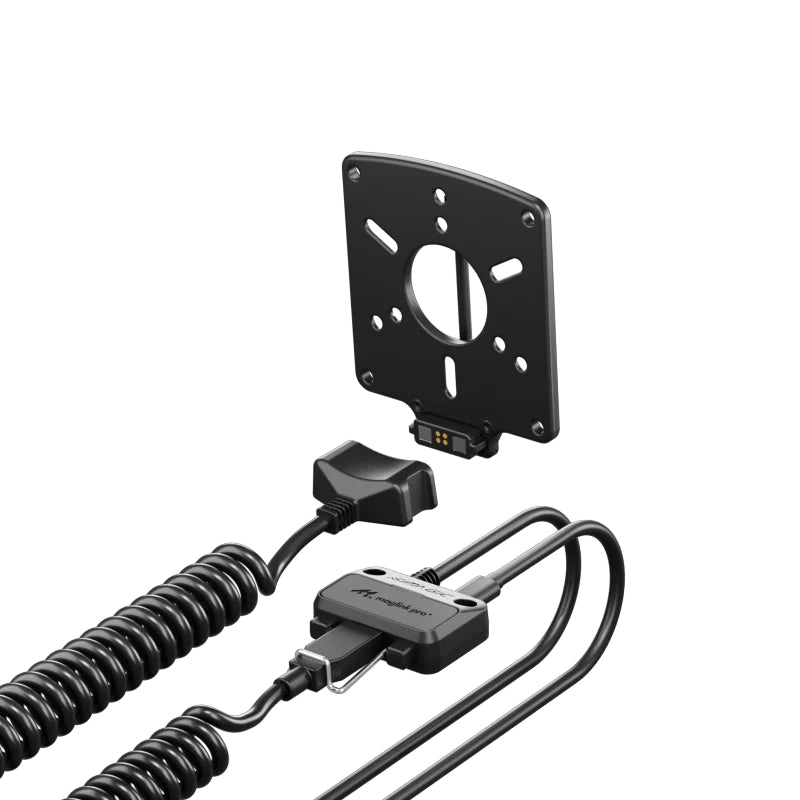
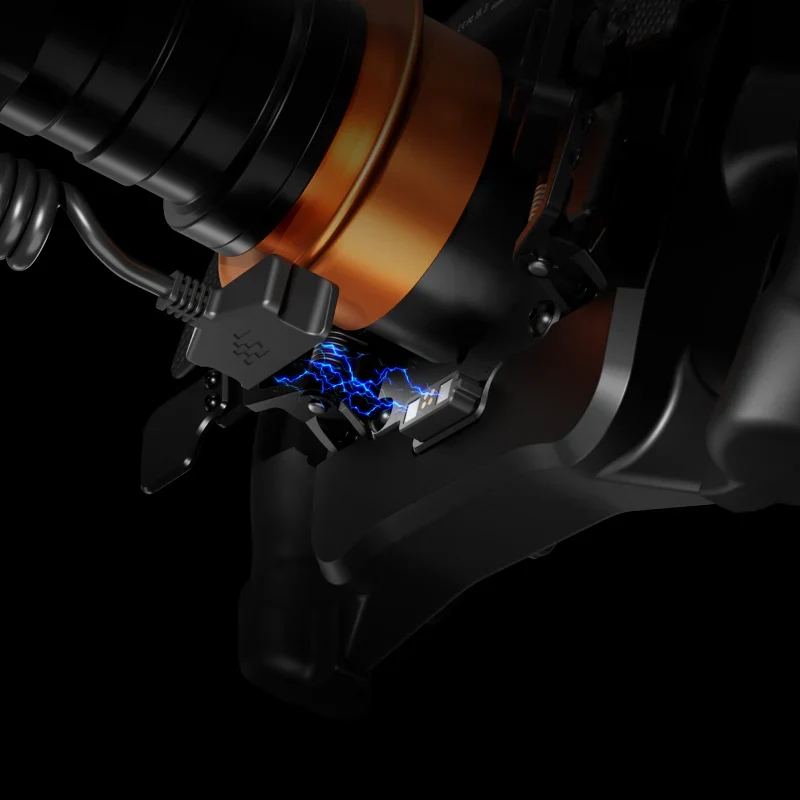
MagLink Pro uses a wired USB connection between your wheel and PC. The gold-pin connector at the wheel side provides a secure, low-resistance data path, while the coiled cable handles steering rotation across the full lock range without tangling. The hub body mounts to the wheelbase shaft via the included mounting plate.
- Included in every MagicDash 4 box, no separate purchase needed for standard setups.
- USB-C to PC, plug-in on your PC side handles the wireless link to the display.
- Auto-recognised, All inputs and RGB shift lights are fully retained through MagLink Pro.
- Standalone availability, also sold separately for additional displays or as a replacement.


Works With Every Setup
Zeus Series. Any Wheelbase. Any Sim.
iRacing · ACC · Assetto Corsa · F1 Series · rFactor 2 · LMU · And More
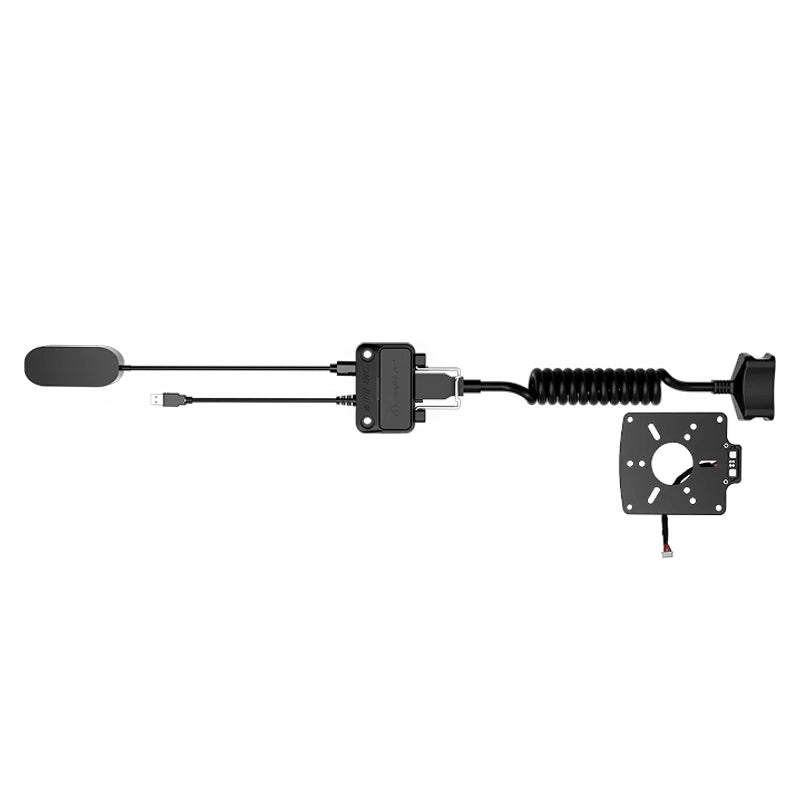
MagLink Pro ships as a complete installation kit, mounting plate, hub body, coiled cable, USB cable, and sim connector. Every component needed to connect a Zeus wheel to your wheelbase is included. No additional hardware required.
- All wheelbases, Alpha EVO, Alpha Series, M10, Simucube, MOZA, Fanatec, VRS, Asetek.
- All Zeus wheels, Zeus Formula, GT, Sport.
- Standalone MagicDash 4, works with or without a Zeus wheel present.
- All major PC sims, via SimHub (free) or SimPro Manager V3 (free).
Why MagLink Pro
Built to connect anything to anything.
Proprietary Wireless, Not Bluetooth
Every button, rotary encoder, thumb control, and Hall-sensor paddle on your Zeus wheel passes through MagLink Pro to your PC with full fidelity. No inputs are lost or downgraded compared to a native Alpha EVO connection.
Manages MagicDash 4 in SimPro V3
All 15 RGB shift indicator LEDs on your Zeus wheel operate normally through MagLink Pro. Full SimHub and SimPro Manager V3 control over shift point colours and telemetry-linked zones is retained.
Included, No Extra Cost
MagLink Pro doesn't limit your software options. SimHub and SimPro Manager V3 both see the Zeus wheel as a fully connected device, all configuration, remapping, LED control, and telemetry integration works as normal.
Run Multiple Displays
The 3m coiled cable between wheel and hub handles full steering rotation without tangling, kinking, or applying rotational resistance. The cable extends and retracts naturally with every steering input.
Technical Specifications
MagLink Pro, Full Specifications
Simagic UP+ Ecosystem
MagLink Pro Wheelbase Adapter

Common questions
MagLink Pro FAQ
What It Does
What does MagLink Pro do?
MagLink Pro is the adapter that connects Zeus Series wheels to non-Alpha-EVO wheelbases, Simagic Alpha Series, M10, Simucube, MOZA, Fanatec, VRS, Asetek, and other third-party direct drive bases. It mounts to the wheelbase shaft via the included mounting plate, connects to the Zeus wheel via a coiled cable, and passes all inputs, RGB shift lights, and SimHub/SimPro V3 data to your PC via USB. Every feature of your Zeus wheel is fully retained.
Do I need MagLink Pro for an Alpha EVO base?
No. Zeus wheels connect natively to all Alpha EVO series bases, Alpha EVO 9Nm, Alpha EVO Pro 18Nm, Alpha EVO Ultra, and Alpha EVO Sport, with no adapter needed. MagLink Pro is only required for Alpha Mini, Alpha, Alpha Ultimate, M10, and all third-party bases.
What is the difference between MagLink Pro and MagLink Pro Xtend?
MagLink Pro uses a wired USB connection and is for connecting Zeus wheels to non-EVO wheelbases. MagLink Pro Xtend provides wireless connectivity and is specifically for wireless Zeus/Neo X wheel connections on Alpha Series bases, or for running a standalone MagicDash 4 (without a Zeus wheel) on any non-EVO rig. If you want a Zeus wheel on your MOZA or Simucube base, standard MagLink Pro is all you need.
Setup & Compatibility
What wheelbases is MagLink Pro compatible with?
MagLink Pro works with: Simagic Alpha Series (Alpha Mini, Alpha, Alpha Ultimate, M10); Simucube 2 (Sport, Pro, Ultimate); MOZA (R5, R9, R12, R16, R21); Fanatec (CSL DD, CSL DD Pro, Podium DD1, Podium DD2); VRS (DirectForce Pro); Asetek (Forte, Invicta); and most other third-party direct drive bases with standard USB connectivity. Call 0488 385 870 to confirm your specific model before ordering.
Does MagLink Pro work with MagicDash 4?
MagLink Pro enables Zeus wheel functionality on non-EVO bases. For MagicDash 4 support on those same bases, MagDock (sold separately) is also required. MagLink Pro alone does not enable the MagicDash 4 dashboard, MagDock handles the physical mount and dashboard data connection on Alpha Series and third-party bases.
Does MagLink Pro work with SimHub?
Yes, all SimHub functionality is fully retained through MagLink Pro. Button remapping, RGB shift light configuration, telemetry-linked encoder lighting, and MagicDash 4 dashboard display all work via SimHub exactly as they do on a native Alpha EVO connection.
Purchasing at Player1 Sim Gear
Is MagLink Pro in stock in Australia?
Yes, we stock MagLink Pro at our Queensland warehouse as an authorised Simagic dealer. Call 0488 385 870 to confirm availability before ordering.
What warranty does MagLink Pro come with?
MagLink Pro purchased from Player1 Sim Gear carries Simagic's 2-year manufacturer warranty and is covered by Australian Consumer Law. Warranty claims are handled locally, no international shipping required. Contact us at player1simgear.freshdesk.com or on 0488 385 870.
After-Sales
Warranty & Support
Simagic 2-Year Warranty
All Simagic accessories from Player1 Sim Gear carry the manufacturer warranty. Authorised dealer, claims handled locally in Australia.
Australian Consumer Law
All purchases covered by ACL, acceptable quality, fitness for purpose, and statutory rights.
Local Support, 0488 385 870
Queensland-based team. Setup help, compatibility questions, and warranty claims handled in Australia.
Help Desk
Open a ticket at player1simgear.freshdesk.com for technical queries or warranty claims.
Build the full experience
Complete your sim cockpit
Pair MagLink Pro with a Zeus Series wheel and MagicDash 4 to complete the full Simagic UP+ ecosystem on your base.


Not sure if MagLink Pro works with your wheelbase?
Give us your wheelbase model and we'll confirm compatibility before you order. We can also advise on whether you need MagDock alongside MagLink Pro for MagicDash 4 support.
Details & Craftsmanship
Every detail has been carefully considered to bring you the perfect product.
Details & Craftsmanship
Every detail has been carefully considered to bring you the perfect product.
Details & Craftsmanship
Every detail has been carefully considered to bring you the perfect product.
Details & Craftsmanship
Every detail has been carefully considered to bring you the perfect product.
Description
Product Detail
What MagLink Pro does
Wireless Technology
Proprietary Protocol. Zero Interference.
Dual Antenna · Anti-Interference · Low Latency
Zeus wheels connect natively to Alpha EVO bases, but for everyone else, MagLink Pro is the bridge. It mounts to the wheelbase shaft, connects via the coiled cable to the wheel, and passes all data through USB to your PC. Every button, rotary, encoder, shift light, and SimHub feature works exactly as it would on a native Alpha EVO connection.
- Proprietary protocol, not Wi-Fi or Bluetooth, purpose-built for sim environments.
- Dual antennas, integrated into the housing for optimal wireless range and stability.
- Anti-interference design, active management for environments with multiple wireless devices.
- Low-latency telemetry, consistent data delivery to the MagicDash 4 display in real time.
Simple Setup
Plug into PC. Done.
USB-C to PC · SimHub · SimPro Manager V3
MagLink Pro uses a wired USB connection between your wheel and PC. The gold-pin connector at the wheel side provides a secure, low-resistance data path, while the coiled cable handles steering rotation across the full lock range without tangling. The hub body mounts to the wheelbase shaft via the included mounting plate.
- Included in every MagicDash 4 box, no separate purchase needed for standard setups.
- USB-C to PC, plug-in on your PC side handles the wireless link to the display.
- Auto-recognised, All inputs and RGB shift lights are fully retained through MagLink Pro.
- Standalone availability, also sold separately for additional displays or as a replacement.
Works With Every Setup
Zeus Series. Any Wheelbase. Any Sim.
iRacing · ACC · Assetto Corsa · F1 Series · rFactor 2 · LMU · And More
MagLink Pro ships as a complete installation kit, mounting plate, hub body, coiled cable, USB cable, and sim connector. Every component needed to connect a Zeus wheel to your wheelbase is included. No additional hardware required.
- All wheelbases, Alpha EVO, Alpha Series, M10, Simucube, MOZA, Fanatec, VRS, Asetek.
- All Zeus wheels, Zeus Formula, GT, Sport.
- Standalone MagicDash 4, works with or without a Zeus wheel present.
- All major PC sims, via SimHub (free) or SimPro Manager V3 (free).
Why MagLink Pro
Built to connect anything to anything.
Proprietary Wireless, Not Bluetooth
Every button, rotary encoder, thumb control, and Hall-sensor paddle on your Zeus wheel passes through MagLink Pro to your PC with full fidelity. No inputs are lost or downgraded compared to a native Alpha EVO connection.
Manages MagicDash 4 in SimPro V3
All 15 RGB shift indicator LEDs on your Zeus wheel operate normally through MagLink Pro. Full SimHub and SimPro Manager V3 control over shift point colours and telemetry-linked zones is retained.
Included, No Extra Cost
MagLink Pro doesn't limit your software options. SimHub and SimPro Manager V3 both see the Zeus wheel as a fully connected device, all configuration, remapping, LED control, and telemetry integration works as normal.
Run Multiple Displays
The 3m coiled cable between wheel and hub handles full steering rotation without tangling, kinking, or applying rotational resistance. The cable extends and retracts naturally with every steering input.
Technical Specifications
MagLink Pro, Full Specifications
Simagic UP+ Ecosystem
MagLink Pro Wheelbase Adapter
Common questions
MagLink Pro FAQ
What It Does
What does MagLink Pro do?
MagLink Pro is the adapter that connects Zeus Series wheels to non-Alpha-EVO wheelbases, Simagic Alpha Series, M10, Simucube, MOZA, Fanatec, VRS, Asetek, and other third-party direct drive bases. It mounts to the wheelbase shaft via the included mounting plate, connects to the Zeus wheel via a coiled cable, and passes all inputs, RGB shift lights, and SimHub/SimPro V3 data to your PC via USB. Every feature of your Zeus wheel is fully retained.
Do I need MagLink Pro for an Alpha EVO base?
No. Zeus wheels connect natively to all Alpha EVO series bases, Alpha EVO 9Nm, Alpha EVO Pro 18Nm, Alpha EVO Ultra, and Alpha EVO Sport, with no adapter needed. MagLink Pro is only required for Alpha Mini, Alpha, Alpha Ultimate, M10, and all third-party bases.
What is the difference between MagLink Pro and MagLink Pro Xtend?
MagLink Pro uses a wired USB connection and is for connecting Zeus wheels to non-EVO wheelbases. MagLink Pro Xtend provides wireless connectivity and is specifically for wireless Zeus/Neo X wheel connections on Alpha Series bases, or for running a standalone MagicDash 4 (without a Zeus wheel) on any non-EVO rig. If you want a Zeus wheel on your MOZA or Simucube base, standard MagLink Pro is all you need.
Setup & Compatibility
What wheelbases is MagLink Pro compatible with?
MagLink Pro works with: Simagic Alpha Series (Alpha Mini, Alpha, Alpha Ultimate, M10); Simucube 2 (Sport, Pro, Ultimate); MOZA (R5, R9, R12, R16, R21); Fanatec (CSL DD, CSL DD Pro, Podium DD1, Podium DD2); VRS (DirectForce Pro); Asetek (Forte, Invicta); and most other third-party direct drive bases with standard USB connectivity. Call 0488 385 870 to confirm your specific model before ordering.
Does MagLink Pro work with MagicDash 4?
MagLink Pro enables Zeus wheel functionality on non-EVO bases. For MagicDash 4 support on those same bases, MagDock (sold separately) is also required. MagLink Pro alone does not enable the MagicDash 4 dashboard, MagDock handles the physical mount and dashboard data connection on Alpha Series and third-party bases.
Does MagLink Pro work with SimHub?
Yes, all SimHub functionality is fully retained through MagLink Pro. Button remapping, RGB shift light configuration, telemetry-linked encoder lighting, and MagicDash 4 dashboard display all work via SimHub exactly as they do on a native Alpha EVO connection.
Purchasing at Player1 Sim Gear
Is MagLink Pro in stock in Australia?
Yes, we stock MagLink Pro at our Queensland warehouse as an authorised Simagic dealer. Call 0488 385 870 to confirm availability before ordering.
What warranty does MagLink Pro come with?
MagLink Pro purchased from Player1 Sim Gear carries Simagic's 2-year manufacturer warranty and is covered by Australian Consumer Law. Warranty claims are handled locally, no international shipping required. Contact us at player1simgear.freshdesk.com or on 0488 385 870.
After-Sales
Warranty & Support
Simagic 2-Year Warranty
All Simagic accessories from Player1 Sim Gear carry the manufacturer warranty. Authorised dealer, claims handled locally in Australia.
Australian Consumer Law
All purchases covered by ACL, acceptable quality, fitness for purpose, and statutory rights.
Local Support, 0488 385 870
Queensland-based team. Setup help, compatibility questions, and warranty claims handled in Australia.
Help Desk
Open a ticket at player1simgear.freshdesk.com for technical queries or warranty claims.
Build the full experience
Complete your sim cockpit
Pair MagLink Pro with a Zeus Series wheel and MagicDash 4 to complete the full Simagic UP+ ecosystem on your base.
Not sure if MagLink Pro works with your wheelbase?
Give us your wheelbase model and we'll confirm compatibility before you order. We can also advise on whether you need MagDock alongside MagLink Pro for MagicDash 4 support.