Common questions
\nMagLink Pro Xtend FAQ
\nWhat It Does
\n\nWhat does MagLink Pro Xtend do?
\nMagLink Pro Xtend is an all-aluminium Simagic QR50 quick-release connector with a magnetic data port built into the base. It connects Zeus Series wheels to Alpha Series / M10 bases (Alpha, Alpha Mini, Alpha Ultimate, M10), and also unlocks USB mode for Neo X and GT Neo wheels on these bases, enabling full SimHub functionality. It is NOT suitable for Alpha EVO bases.
\nDoes MagLink Pro Xtend work with third-party bases?
\nNo, MagLink Pro Xtend is for Simagic Alpha Series and M10 bases only (Alpha, Alpha Mini, Alpha Ultimate, M10). It is not compatible with third-party bases such as Simucube, MOZA, or Fanatec. It is also not required for Alpha EVO bases, which connect natively to Zeus wheels. If you're unsure which adapter you need, call us on 0488 385 870.
\nSetup & Compatibility
\n\nWhat wheelbases is MagLink Pro Xtend compatible with?
\nMagLink Pro Xtend is compatible with Simagic Alpha Series and M10 bases only: Alpha Mini, Alpha, Alpha Ultimate, and M10. It is not compatible with third-party bases (Simucube, MOZA, Fanatec, etc.), for those bases, standard MagLink Pro is required. Call 0488 385 870 to confirm before ordering.
\nDoes MagLink Pro Xtend unlock SimHub for Neo X wheels?
\nYes, MagLink Pro Xtend unlocks full SimHub support for Simagic Neo X and GT Neo wheels on Alpha Series and M10 bases. Without Xtend, Neo X and GT Neo wheels on Alpha Series bases do not have SimHub telemetry access. If you run a Neo X on an Alpha Mini, Alpha, or M10 and want SimHub, MagLink Pro Xtend is required.
\nDoes MagLink Pro Xtend work with SimHub?
\nYes, all SimHub functionality works through MagLink Pro Xtend. Button remapping, RGB shift light configuration, and MagicDash 4 dashboard display all operate normally via SimHub. MagLink Pro Xtend also unlocks SimHub support for Neo X and GT Neo wheels on Alpha Series / M10 bases.
\nPurchasing at Player1 Sim Gear
\n\nIs MagLink Pro Xtend in stock in Australia?
\nYes, we stock MagLink Pro Xtend at our Queensland warehouse as an authorised Simagic dealer. Call 0488 385 870 to confirm availability before ordering.
\nWhat warranty does MagLink Pro Xtend come with?
\nMagLink Pro Xtend purchased from Player1 Sim Gear carries Simagic's 2-year manufacturer warranty and is covered by Australian Consumer Law. Warranty claims are handled locally, no international shipping required. Contact us at player1simgear.freshdesk.com or on 0488 385 870.
\nAfter-Sales
\nWarranty & Support
\nSimagic 2-Year Warranty
\nAll Simagic accessories from Player1 Sim Gear carry the manufacturer warranty. Authorised dealer, claims handled locally in Australia.
\nAustralian Consumer Law
\nAll purchases covered by ACL, acceptable quality, fitness for purpose, and statutory rights.
\nLocal Support, 0488 385 870
\nQueensland-based team. Setup help, compatibility questions, and warranty claims handled in Australia.
\nHelp Desk
\nOpen a ticket at player1simgear.freshdesk.com for technical queries or warranty claims.
\nBuild the full experience
\nComplete your sim cockpit
\nPair MagLink Pro Xtend with a Zeus Series wheel and MagicDash 4 to run the full Simagic UP+ ecosystem on your Alpha Series or M10 base.
\n \n
\n Simagic Full Range
\nWheelbases, wheels, pedals & more
\nShop Simagic →
\n \n
\n Zeus Rims & Accessories
\nMagicDash 4, MagDock, MagLink Pro
\nShop Zeus Accessories →
\n \n
\n Sim Cockpits
\nRacing cockpit frames & rigs
\nShop Cockpits →
\n \n
\n VR Headsets
\nPimax Crystal Super, Crystal Light & more
\nShop VR →
\nNot sure if MagLink Pro Xtend is right for your setup?
\nMagLink Pro Xtend is for Alpha Series / M10 only. Give us your wheelbase model and we'll confirm it's the right adapter before you order.
\n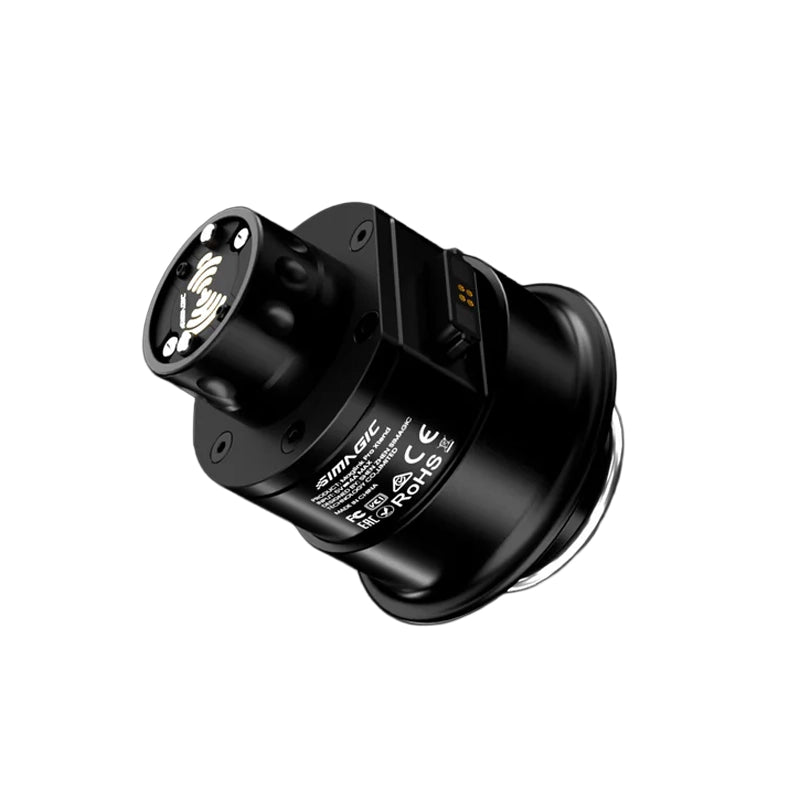
The Story

Do you actually need it?
The most situational part in the Zeus range. Here is the honest answer.
The MagLink Pro Xtend solves one specific problem. For most setups the standard MagLink Pro is the right choice. Here is exactly who the Xtend is for, and who should skip it.
GET IT if BOTH are true
- You run an Alpha wheelbase (Alpha, Alpha Mini, Alpha Ultimate or M10), and
- You own more than one Zeus wheel that you swap between.
The Xtend mounts on the base, so a single MagLink Pro serves every wheel you own. Set it up once and swap wheels freely, with no MagLink Pro needed per wheel. For a multi-wheel Alpha collection it saves money and keeps things tidy.
SKIP IT if any of these
- You own a single Zeus wheel. Just buy the MagLink Pro for that wheel.
- You are on Alpha EVO. Connect natively: wireless with AirLink or wired with MagLink Pro.
- You are on a third-party base. Use MagLink Pro.
The honest summary: MagLink Pro Xtend is a niche convenience for Alpha owners with several Zeus wheels. If that is not you, the standard MagLink Pro is what you want, and you can spend the difference elsewhere in your rig.
Product Detail
What MagLink Pro Xtend does

QR50 Quick-Release Connector
Seamless Connection. Alpha Series & M10.
Alpha · Alpha Mini · Alpha Ultimate · M10, Not Alpha EVO
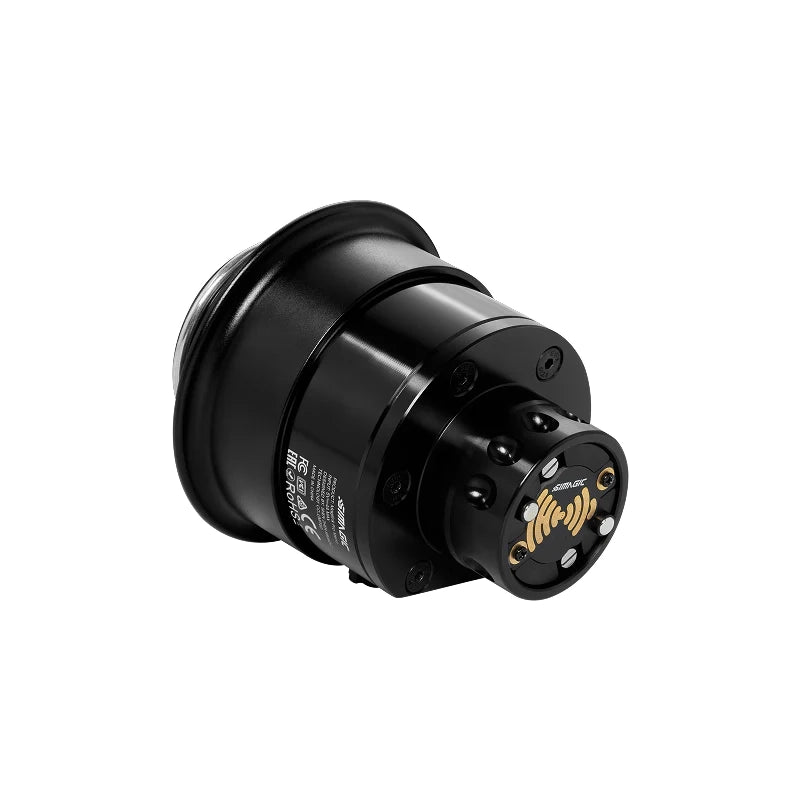
MagLink Pro Xtend is an all-aluminium Simagic QR50 quick-release connector with a magnetic data port built directly into the base. It mounts to your Alpha Series or M10 wheelbase shaft and connects your Zeus Series wheel, passing all inputs, RGB shift light data, and SimHub telemetry through to your PC. Designed specifically for Alpha, Alpha Mini, Alpha Ultimate, and M10. Not suitable for Alpha EVO bases, which connect natively to Zeus wheels without any adapter.
- All-aluminium QR50 construction, precision-machined quick-release compatible with the Simagic QR50 standard.
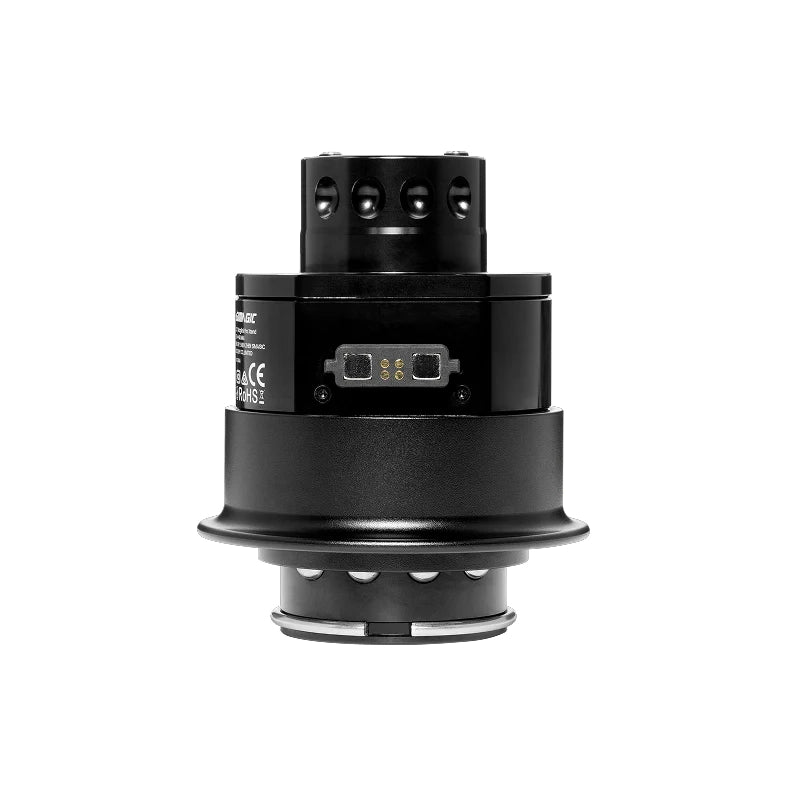
- Magnetic data port, built into the base of the connector for reliable, repeatable data connection.
- Alpha Series / M10 only, Alpha, Alpha Mini, Alpha Ultimate, M10. NOT compatible with Alpha EVO.
- All inputs retained, every button, encoder, rotary, thumb control, and shift light passes through fully.
Simple Setup
Plug into PC. Done.
USB-C to PC · SimHub · SimPro Manager V3
MagLink Pro Xtend also unlocks USB mode for Simagic Neo X and GT Neo wheels on Alpha Series and M10 bases, enabling full SimHub telemetry and input support for these wheels. Without Xtend, Neo X and GT Neo on Alpha Series bases do not have access to SimHub functionality.
- Included in every MagicDash 4 box, no separate purchase needed for standard setups.
- USB mode for Neo X, unlocks full SimHub support on Alpha Series / M10 bases.
- USB mode for GT Neo, same SimHub unlock applies to GT Neo on Alpha Series / M10.
- Standalone availability, also sold separately for additional displays or as a replacement.


Works With Every Setup
Your Alpha Base. Your Zeus Wheel. One Connector.
iRacing · ACC · Assetto Corsa · F1 Series · rFactor 2 · LMU · And More
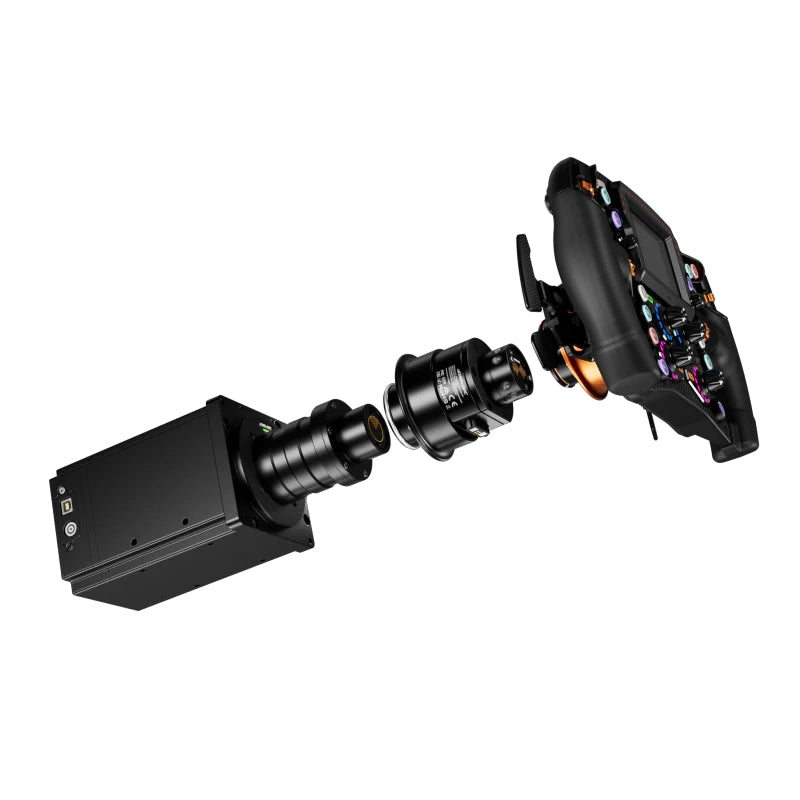
MagLink Pro Xtend mounts directly to the Alpha Series or M10 wheelbase shaft via the QR50 standard. The magnetic data port at the base of the connector provides the data link between the wheel and base. Connect the USB cable to your PC and you're ready to go.
- Alpha Series / M10 only, Alpha, Alpha Mini, Alpha Ultimate, M10. Not for Alpha EVO or third-party bases.
- All Zeus wheels, Zeus Formula, GT, Sport.
- Neo X + GT Neo SimHub, Xtend also unlocks full SimHub support for Neo X and GT Neo wheels on Alpha Series bases.
- All major PC sims, via SimHub (free) or SimPro Manager V3 (free).
Why MagLink Pro Xtend
The Alpha Series connection, solved.
All Inputs Fully Retained
Every button, rotary encoder, thumb control, and Hall-sensor paddle on your Zeus wheel passes through MagLink Pro Xtend to your PC with full fidelity. No inputs are lost or downgraded compared to a native Alpha EVO connection.
Manages MagicDash 4 in SimPro V3
All 15 RGB shift indicator LEDs on your Zeus wheel operate normally through MagLink Pro Xtend. Full SimHub and SimPro Manager V3 control over shift point colours and telemetry-linked zones is retained.
Included, No Extra Cost
MagLink Pro Xtend also unlocks SimHub compatibility for Neo X and GT Neo wheels on Alpha Series bases, a feature not available with standard wired connections. Full SimHub dashboard, LED, and input mapping support.
Run Multiple Displays
MagLink Pro Xtend uses the Simagic QR50 standard, a precision all-aluminium quick-release that connects and disconnects cleanly with one motion. The magnetic data port built into the base of the connector makes data connection automatic on attachment.
Technical Specifications
MagLink Pro Xtend, Full Specifications
Simagic UP+ Ecosystem
MagLink Pro Xtend QR50 Connector

Common questions
MagLink Pro Xtend FAQ
What It Does
What does MagLink Pro Xtend do?
MagLink Pro Xtend is an all-aluminium Simagic QR50 quick-release connector with a magnetic data port built into the base. It connects Zeus Series wheels to Alpha Series / M10 bases (Alpha, Alpha Mini, Alpha Ultimate, M10), and also unlocks USB mode for Neo X and GT Neo wheels on these bases, enabling full SimHub functionality. It is NOT suitable for Alpha EVO bases.
Does MagLink Pro Xtend work with third-party bases?
No, MagLink Pro Xtend is for Simagic Alpha Series and M10 bases only (Alpha, Alpha Mini, Alpha Ultimate, M10). It is not compatible with third-party bases such as Simucube, MOZA, or Fanatec. It is also not required for Alpha EVO bases, which connect natively to Zeus wheels. If you're unsure which adapter you need, call us on 0488 385 870.
Setup & Compatibility
What wheelbases is MagLink Pro Xtend compatible with?
MagLink Pro Xtend is compatible with Simagic Alpha Series and M10 bases only: Alpha Mini, Alpha, Alpha Ultimate, and M10. It is not compatible with third-party bases (Simucube, MOZA, Fanatec, etc.), for those bases, standard MagLink Pro is required. Call 0488 385 870 to confirm before ordering.
Does MagLink Pro Xtend unlock SimHub for Neo X wheels?
Yes, MagLink Pro Xtend unlocks full SimHub support for Simagic Neo X and GT Neo wheels on Alpha Series and M10 bases. Without Xtend, Neo X and GT Neo wheels on Alpha Series bases do not have SimHub telemetry access. If you run a Neo X on an Alpha Mini, Alpha, or M10 and want SimHub, MagLink Pro Xtend is required.
Does MagLink Pro Xtend work with SimHub?
Yes, all SimHub functionality works through MagLink Pro Xtend. Button remapping, RGB shift light configuration, and MagicDash 4 dashboard display all operate normally via SimHub. MagLink Pro Xtend also unlocks SimHub support for Neo X and GT Neo wheels on Alpha Series / M10 bases.
Purchasing at Player1 Sim Gear
Is MagLink Pro Xtend in stock in Australia?
Yes, we stock MagLink Pro Xtend at our Queensland warehouse as an authorised Simagic dealer. Call 0488 385 870 to confirm availability before ordering.
What warranty does MagLink Pro Xtend come with?
MagLink Pro Xtend purchased from Player1 Sim Gear carries Simagic's 2-year manufacturer warranty and is covered by Australian Consumer Law. Warranty claims are handled locally, no international shipping required. Contact us at player1simgear.freshdesk.com or on 0488 385 870.
After-Sales
Warranty & Support
Simagic 2-Year Warranty
All Simagic accessories from Player1 Sim Gear carry the manufacturer warranty. Authorised dealer, claims handled locally in Australia.
Australian Consumer Law
All purchases covered by ACL, acceptable quality, fitness for purpose, and statutory rights.
Local Support, 0488 385 870
Queensland-based team. Setup help, compatibility questions, and warranty claims handled in Australia.
Help Desk
Open a ticket at player1simgear.freshdesk.com for technical queries or warranty claims.
Build the full experience
Complete your sim cockpit
Pair MagLink Pro Xtend with a Zeus Series wheel and MagicDash 4 to run the full Simagic UP+ ecosystem on your Alpha Series or M10 base.


Not sure if MagLink Pro Xtend is right for your setup?
MagLink Pro Xtend is for Alpha Series / M10 only. Give us your wheelbase model and we'll confirm it's the right adapter before you order.
Details & Craftsmanship
Every detail has been carefully considered to bring you the perfect product.
Details & Craftsmanship
Every detail has been carefully considered to bring you the perfect product.
Details & Craftsmanship
Every detail has been carefully considered to bring you the perfect product.
Description
Do you actually need it?
The most situational part in the Zeus range. Here is the honest answer.
The MagLink Pro Xtend solves one specific problem. For most setups the standard MagLink Pro is the right choice. Here is exactly who the Xtend is for, and who should skip it.
GET IT if BOTH are true
- You run an Alpha wheelbase (Alpha, Alpha Mini, Alpha Ultimate or M10), and
- You own more than one Zeus wheel that you swap between.
The Xtend mounts on the base, so a single MagLink Pro serves every wheel you own. Set it up once and swap wheels freely, with no MagLink Pro needed per wheel. For a multi-wheel Alpha collection it saves money and keeps things tidy.
SKIP IT if any of these
- You own a single Zeus wheel. Just buy the MagLink Pro for that wheel.
- You are on Alpha EVO. Connect natively: wireless with AirLink or wired with MagLink Pro.
- You are on a third-party base. Use MagLink Pro.
The honest summary: MagLink Pro Xtend is a niche convenience for Alpha owners with several Zeus wheels. If that is not you, the standard MagLink Pro is what you want, and you can spend the difference elsewhere in your rig.
Product Detail
What MagLink Pro Xtend does
QR50 Quick-Release Connector
Seamless Connection. Alpha Series & M10.
Alpha · Alpha Mini · Alpha Ultimate · M10, Not Alpha EVO
MagLink Pro Xtend is an all-aluminium Simagic QR50 quick-release connector with a magnetic data port built directly into the base. It mounts to your Alpha Series or M10 wheelbase shaft and connects your Zeus Series wheel, passing all inputs, RGB shift light data, and SimHub telemetry through to your PC. Designed specifically for Alpha, Alpha Mini, Alpha Ultimate, and M10. Not suitable for Alpha EVO bases, which connect natively to Zeus wheels without any adapter.
- All-aluminium QR50 construction, precision-machined quick-release compatible with the Simagic QR50 standard.
- Magnetic data port, built into the base of the connector for reliable, repeatable data connection.
- Alpha Series / M10 only, Alpha, Alpha Mini, Alpha Ultimate, M10. NOT compatible with Alpha EVO.
- All inputs retained, every button, encoder, rotary, thumb control, and shift light passes through fully.
Simple Setup
Plug into PC. Done.
USB-C to PC · SimHub · SimPro Manager V3
MagLink Pro Xtend also unlocks USB mode for Simagic Neo X and GT Neo wheels on Alpha Series and M10 bases, enabling full SimHub telemetry and input support for these wheels. Without Xtend, Neo X and GT Neo on Alpha Series bases do not have access to SimHub functionality.
- Included in every MagicDash 4 box, no separate purchase needed for standard setups.
- USB mode for Neo X, unlocks full SimHub support on Alpha Series / M10 bases.
- USB mode for GT Neo, same SimHub unlock applies to GT Neo on Alpha Series / M10.
- Standalone availability, also sold separately for additional displays or as a replacement.
Works With Every Setup
Your Alpha Base. Your Zeus Wheel. One Connector.
iRacing · ACC · Assetto Corsa · F1 Series · rFactor 2 · LMU · And More
MagLink Pro Xtend mounts directly to the Alpha Series or M10 wheelbase shaft via the QR50 standard. The magnetic data port at the base of the connector provides the data link between the wheel and base. Connect the USB cable to your PC and you're ready to go.
- Alpha Series / M10 only, Alpha, Alpha Mini, Alpha Ultimate, M10. Not for Alpha EVO or third-party bases.
- All Zeus wheels, Zeus Formula, GT, Sport.
- Neo X + GT Neo SimHub, Xtend also unlocks full SimHub support for Neo X and GT Neo wheels on Alpha Series bases.
- All major PC sims, via SimHub (free) or SimPro Manager V3 (free).
Why MagLink Pro Xtend
The Alpha Series connection, solved.
All Inputs Fully Retained
Every button, rotary encoder, thumb control, and Hall-sensor paddle on your Zeus wheel passes through MagLink Pro Xtend to your PC with full fidelity. No inputs are lost or downgraded compared to a native Alpha EVO connection.
Manages MagicDash 4 in SimPro V3
All 15 RGB shift indicator LEDs on your Zeus wheel operate normally through MagLink Pro Xtend. Full SimHub and SimPro Manager V3 control over shift point colours and telemetry-linked zones is retained.
Included, No Extra Cost
MagLink Pro Xtend also unlocks SimHub compatibility for Neo X and GT Neo wheels on Alpha Series bases, a feature not available with standard wired connections. Full SimHub dashboard, LED, and input mapping support.
Run Multiple Displays
MagLink Pro Xtend uses the Simagic QR50 standard, a precision all-aluminium quick-release that connects and disconnects cleanly with one motion. The magnetic data port built into the base of the connector makes data connection automatic on attachment.
Technical Specifications
MagLink Pro Xtend, Full Specifications
Simagic UP+ Ecosystem
MagLink Pro Xtend QR50 Connector
Common questions
MagLink Pro Xtend FAQ
What It Does
What does MagLink Pro Xtend do?
MagLink Pro Xtend is an all-aluminium Simagic QR50 quick-release connector with a magnetic data port built into the base. It connects Zeus Series wheels to Alpha Series / M10 bases (Alpha, Alpha Mini, Alpha Ultimate, M10), and also unlocks USB mode for Neo X and GT Neo wheels on these bases, enabling full SimHub functionality. It is NOT suitable for Alpha EVO bases.
Does MagLink Pro Xtend work with third-party bases?
No, MagLink Pro Xtend is for Simagic Alpha Series and M10 bases only (Alpha, Alpha Mini, Alpha Ultimate, M10). It is not compatible with third-party bases such as Simucube, MOZA, or Fanatec. It is also not required for Alpha EVO bases, which connect natively to Zeus wheels. If you're unsure which adapter you need, call us on 0488 385 870.
Setup & Compatibility
What wheelbases is MagLink Pro Xtend compatible with?
MagLink Pro Xtend is compatible with Simagic Alpha Series and M10 bases only: Alpha Mini, Alpha, Alpha Ultimate, and M10. It is not compatible with third-party bases (Simucube, MOZA, Fanatec, etc.), for those bases, standard MagLink Pro is required. Call 0488 385 870 to confirm before ordering.
Does MagLink Pro Xtend unlock SimHub for Neo X wheels?
Yes, MagLink Pro Xtend unlocks full SimHub support for Simagic Neo X and GT Neo wheels on Alpha Series and M10 bases. Without Xtend, Neo X and GT Neo wheels on Alpha Series bases do not have SimHub telemetry access. If you run a Neo X on an Alpha Mini, Alpha, or M10 and want SimHub, MagLink Pro Xtend is required.
Does MagLink Pro Xtend work with SimHub?
Yes, all SimHub functionality works through MagLink Pro Xtend. Button remapping, RGB shift light configuration, and MagicDash 4 dashboard display all operate normally via SimHub. MagLink Pro Xtend also unlocks SimHub support for Neo X and GT Neo wheels on Alpha Series / M10 bases.
Purchasing at Player1 Sim Gear
Is MagLink Pro Xtend in stock in Australia?
Yes, we stock MagLink Pro Xtend at our Queensland warehouse as an authorised Simagic dealer. Call 0488 385 870 to confirm availability before ordering.
What warranty does MagLink Pro Xtend come with?
MagLink Pro Xtend purchased from Player1 Sim Gear carries Simagic's 2-year manufacturer warranty and is covered by Australian Consumer Law. Warranty claims are handled locally, no international shipping required. Contact us at player1simgear.freshdesk.com or on 0488 385 870.
After-Sales
Warranty & Support
Simagic 2-Year Warranty
All Simagic accessories from Player1 Sim Gear carry the manufacturer warranty. Authorised dealer, claims handled locally in Australia.
Australian Consumer Law
All purchases covered by ACL, acceptable quality, fitness for purpose, and statutory rights.
Local Support, 0488 385 870
Queensland-based team. Setup help, compatibility questions, and warranty claims handled in Australia.
Help Desk
Open a ticket at player1simgear.freshdesk.com for technical queries or warranty claims.
Build the full experience
Complete your sim cockpit
Pair MagLink Pro Xtend with a Zeus Series wheel and MagicDash 4 to run the full Simagic UP+ ecosystem on your Alpha Series or M10 base.
Not sure if MagLink Pro Xtend is right for your setup?
MagLink Pro Xtend is for Alpha Series / M10 only. Give us your wheelbase model and we'll confirm it's the right adapter before you order.